Mailmodo Review (2026): Interactive AMP email for ecommerce and SaaS teams
Mailmodo puts forms, carousels and polls inside the inbox and adds AI campaign generation. Here is who it suits, what it costs and where it falls short.
Check it out Affiliate link · Disclosure
What it is
Mailmodo is an email marketing platform built around one idea: the email itself should be the landing page. Using AMP for Email, it lets subscribers submit a form, answer a poll, book a slot or browse a product carousel without leaving the inbox. Where a mail client does not support AMP, Mailmodo sends a standard HTML fallback automatically, so you are not locked out of Outlook or Apple Mail audiences.
The product is made by Mailmodo Technologies, a startup that came through Y Combinator and now sells mainly to ecommerce brands, SaaS companies and mid-sized marketing teams. Around the interactive core it has added the pieces you would expect from a modern email platform: a visual journey builder, segmentation, deliverability tooling, analytics and an AI layer that drafts subject lines, copy and full campaigns from a short brief.
Who it is for
- Ecommerce teams that want product carousels, cart reminders and review requests completed inside the email rather than after a click.
- SaaS marketers running onboarding and activation sequences triggered by product events.
- Teams that send surveys, NPS checks or event registrations and are tired of low completion rates on external forms.
- Lifecycle marketers who want a journey builder with webhooks and app triggers, not just a newsletter scheduler.
- Small teams with limited design resources who want AI to draft a usable first version of each campaign.
Probably not for you if…
- You send a simple weekly newsletter and do not need interactivity or automation.
- Most of your list reads email in clients that do not render AMP, so the fallback is what they would see anyway.
- You are on a tight budget and a basic newsletter tool already does the job.
Key features
AMP interactive emails
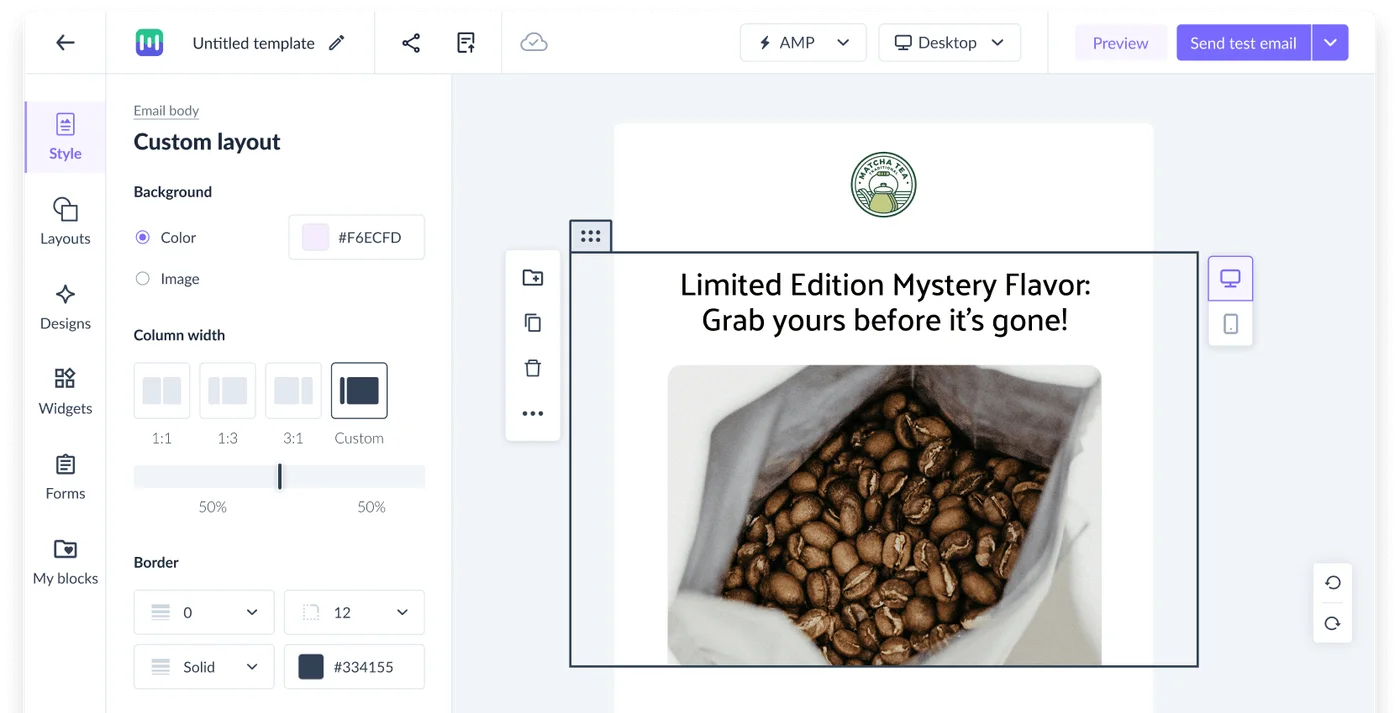
The headline feature is a drag-and-drop editor with interactive blocks: forms, quizzes, polls, calendars, carousels, accordions and ratings. A subscriber can fill in a feedback form or pick a demo slot inside Gmail or Yahoo Mail and the response lands in your dashboard. In our view this is the strongest reason to pick Mailmodo over an ordinary email tool, provided your audience is on supporting clients.

Automatic HTML fallback
Every AMP email ships with an HTML version that Mailmodo generates and sends to clients that do not support AMP. You can preview and tweak the fallback separately. This matters because AMP support is uneven; without a good fallback the whole approach would be too risky for most lists.
AI campaign and journey generation
Mailmodo’s AI assistant writes subject lines, body copy and can lay out a complete campaign or a multi-step journey from a prompt describing your goal and audience. We think it is practical rather than gimmicky: it gets you to a sensible draft quickly, and you still edit before sending.
Visual journey builder
Automations are built on a canvas with triggers from your app, store or CRM via native integrations, webhooks and an API. You can branch on behaviour, including on responses submitted inside AMP emails, which opens up flows that are hard to replicate elsewhere.
Deliverability and analytics
The platform includes domain authentication guidance, list hygiene tools, send-time optimisation and reporting that separates AMP and HTML performance. Dedicated IP options exist for higher-volume senders. The reporting is clear, though not as deep as a dedicated analytics tool.
Integrations
Native connectors cover Shopify, HubSpot, Salesforce, Segment, Zapier and several others, plus a REST API and webhooks. This is enough for most ecommerce and SaaS stacks, although very niche tools may need a Zapier bridge.
Pricing
Mailmodo offers a free trial, after which plans are priced by the number of contacts in your account. Higher tiers add more email credits, more team seats, advanced journey features, priority support and deliverability extras such as dedicated IPs. Annual billing is discounted. Because pricing scales with list size, it is worth modelling your contact growth for the next year before choosing a tier. For current figures, check the Mailmodo pricing page. Some links in this review may be affiliate links, which do not change what you pay.
Pros
- Interactive emails are a genuine differentiator and are easy to build without code.
- Automatic HTML fallback removes the biggest practical risk of AMP.
- The AI assistant produces usable drafts of copy and journeys, not just subject lines.
- The journey builder handles app and store triggers, including in-email responses.
- Reporting separates AMP from HTML so you can see whether interactivity is paying off.
Cons
- AMP support still varies by email client, so the headline feature does not reach everyone.
- It costs more than basic newsletter tools, which hurts if you will not use the interactive features.
- The template library is smaller than that of long-established competitors.
- Advanced features such as dedicated IPs are reserved for higher tiers.
Alternatives
- GetResponse if you want a broader all-in-one suite with landing pages and webinars rather than AMP interactivity.
- Klaviyo if you are a Shopify brand that cares more about deep ecommerce data and predictive segments than in-email forms.
- Customer.io if your priority is developer-friendly, event-driven messaging across email, push and SMS.
Verdict
Rating: 4.0/5. Mailmodo earns a solid four because it does one thing other email platforms mostly do not, and it does it with sensible safeguards. If you run ecommerce or SaaS lifecycle email and your audience skews toward Gmail and Yahoo, the interactive blocks and AI drafting can shorten both the path to conversion and your production time. We think it is worth a trial for teams that send surveys, bookings or product promotions. If you only need a weekly newsletter or your list lives in Outlook, you will be paying a premium for features you will rarely see rendered, and a cheaper tool makes more sense.
Check the current price and what is included on the official site.