Greenlight Publish for Planners and Workbooks: Is the print check useful?
An editorial review of Greenlight Publish for low-content workflows, focusing on PDF checks, sampled margins, design handoffs and what still needs human review.
A planner can look finished on screen and still need another round of production work. The final PDF deserves its own review: does the exported file match the selected book format, and are the pages comfortable to use?
Greenlight Publish targets the first part of that problem with a print-readiness module. For publishers of planners, journals and workbooks, this is a more tangible reason to consider the product than the overall readiness score alone.
Review basis: This assessment uses the official product description and FAQ checked on October 12, 2026. We have not uploaded a planner or tested detection coverage. The workflow below is an illustrative way to use the advertised features, not a customer result or a measured test.
What the print module promises
The vendor says Greenlight measures PDF page size, bleed, page count, image DPI and embedded fonts. It also provides gutter guidance based on page count and flags text within minimum margins on sampled pages.
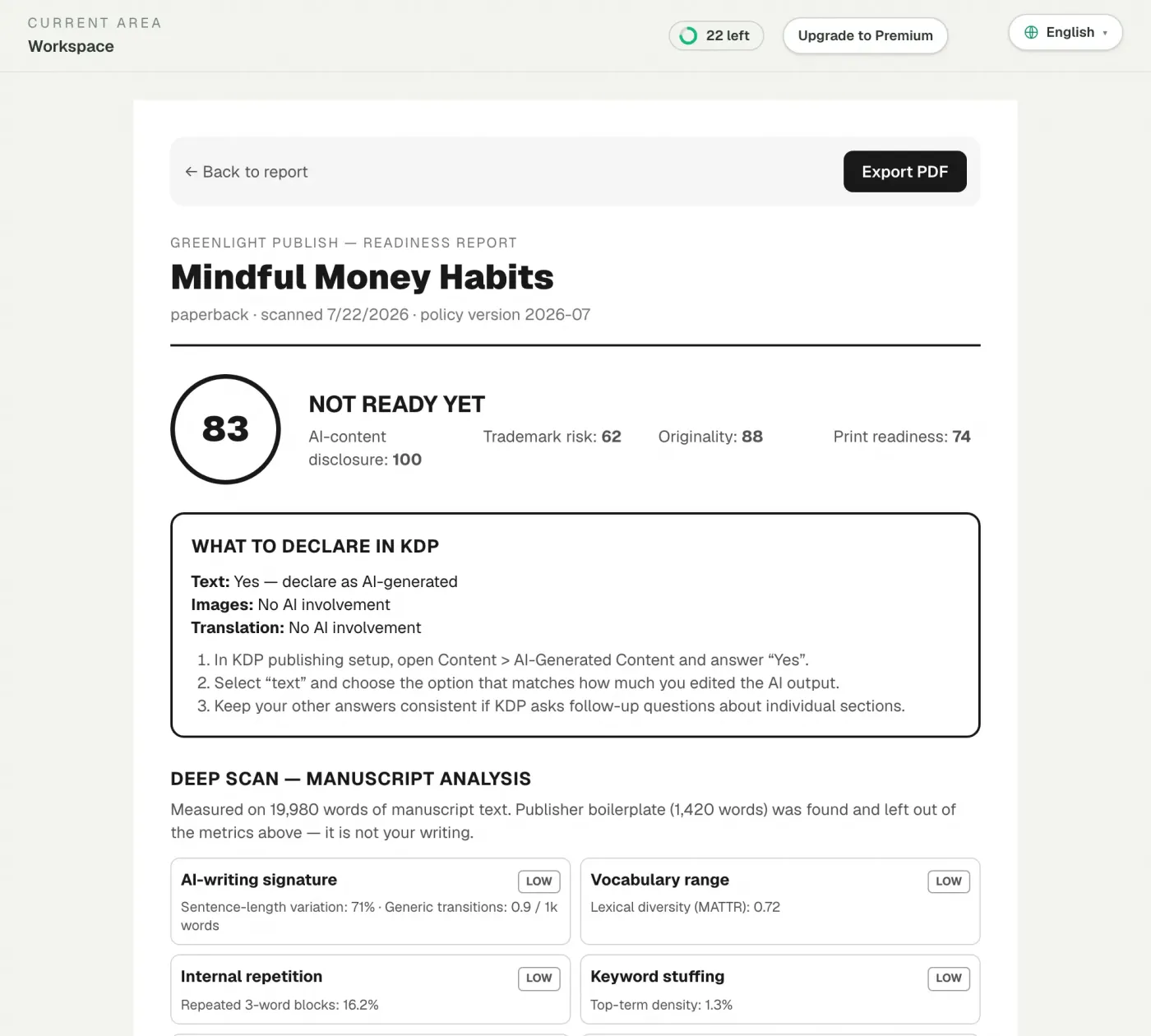
These are useful areas to check after export. A design project’s settings are not enough: the actual file sent to the printer is what matters. Amazon’s paperback submission guidelines remain the authoritative reference for its file requirements.
The appeal is consolidation. Instead of collecting measurements separately, the publisher receives findings in one report and can send a clearer revision brief back to a designer.
The most important limitation: sampled margins
The sales page specifically describes margin checks on sampled pages. That is narrower than a page-by-page layout audit.
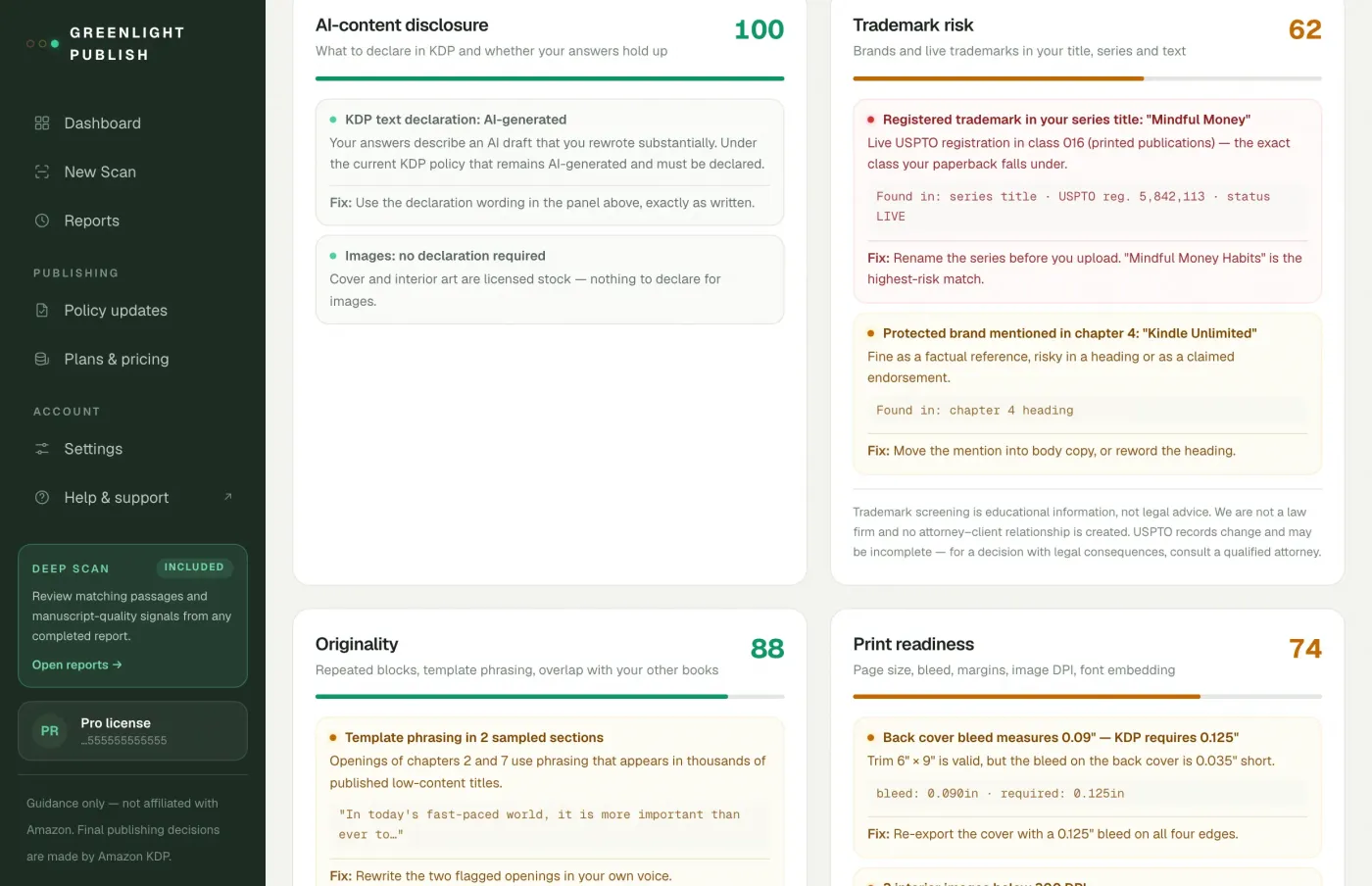
A workbook might have a safe introductory page but a cramped answer box much later in the interior. A planner might change layout at the start of each month. If a problematic page falls outside the sample, this type of check could miss it. We do not know the product’s sampling method or coverage from the public description.
Treat the result as one layer of review. Inspect every distinct page template yourself, especially dense exercises, divider pages and unusual layouts. A score is not a replacement for looking through the book.
A practical place in the production workflow
- Finish and export the interior. Use the actual intended trim size and print settings, and preserve the editable design file.
- Check the final PDF with Greenlight. Supply the relevant book format and accurate production answers.
- Turn findings into a revision brief. Record the reported measurement, affected page or element, and the requested change.
- Review the revised export. Fixing one template can affect several pages, so inspect related layouts as well.
- Continue through KDP’s preview process. Review Amazon’s rendering and any issues it reports before submission.
Amazon explains its preview and correction process in Fix Paperback and Hardcover Formatting Issues. Greenlight could identify work earlier in the process; it does not replace that final platform check.
Beyond file dimensions
The other advertised modules may help with the surrounding publishing decisions. Title and series screening can surface records worth investigating before committing to cover text. The disclosure questionnaire considers the creation of images as well as text, which matters for illustrated interiors.
Originality warnings require context. Repetition is intentional in many planners: recurring date fields and weekly layouts are part of the design. A repeated-block flag should prompt inspection, rather than automatic removal of useful structure.
The tool’s report also cannot tell you whether a worksheet is enjoyable, whether there is enough room to write, or whether instructions are clear for a child. Those are product-quality decisions for the creator.
What we would test before trusting it broadly
Our next step would be a small set of controlled PDFs containing known issues: incorrect dimensions, a low-resolution image, a font problem and a margin issue on a less obvious page. We would compare the findings with manual inspection and KDP’s preview results.
We would also include a clean file and a deliberately repetitive planner. A checker should help prioritise real problems without burying the author in warnings about normal design patterns. Until those tests are run, claims about fewer rejections or money saved would be premature.
Is it a good fit?
It looks most useful for solo publishers who repeatedly hand off interiors to designers or work with several page templates. An ordered report could make revision conversations more precise.
The fit is weaker if you need a tool to create or automatically repair the layout. Greenlight’s public offer describes checks and guidance, not a design editor. Its listed manuscript languages are English, Spanish, German, French, Italian and Portuguese; Vietnamese is not listed as supported.
Scan limits also deserve attention. Starter advertises 10 scans each month. Leave room for revised exports rather than assuming that means 10 completed books. The public page does not fully explain how failed scans or re-scans affect that allowance; confirm this with support if your schedule depends on it.
Verdict
For planners and workbooks, Greenlight’s print module is a plausible addition between final export and KDP upload. Its value would come from finding actionable issues early and making revisions easier to communicate. Sampled margin checks and untested detection coverage keep us from treating it as a complete print audit.
Read the overall Greenlight Publish review for the other modules, or the pricing review before choosing a plan. Our pre-publish checklist covers the broader release process.
Check the current price and what is included on the official site.