Academy › AI Video for Marketers › Lesson 1
When AI video fits, and when it does not
Know the three kinds of AI video and decide whether a given video should be made this way at all. · 7 min read
AI video can save a day of shooting. It can also produce something uncanny, off-brand or misleading. This lesson gives you a quick way to decide before you spend credits.
What you will build
A one-page decision for your next video: which kind of AI video, or none.
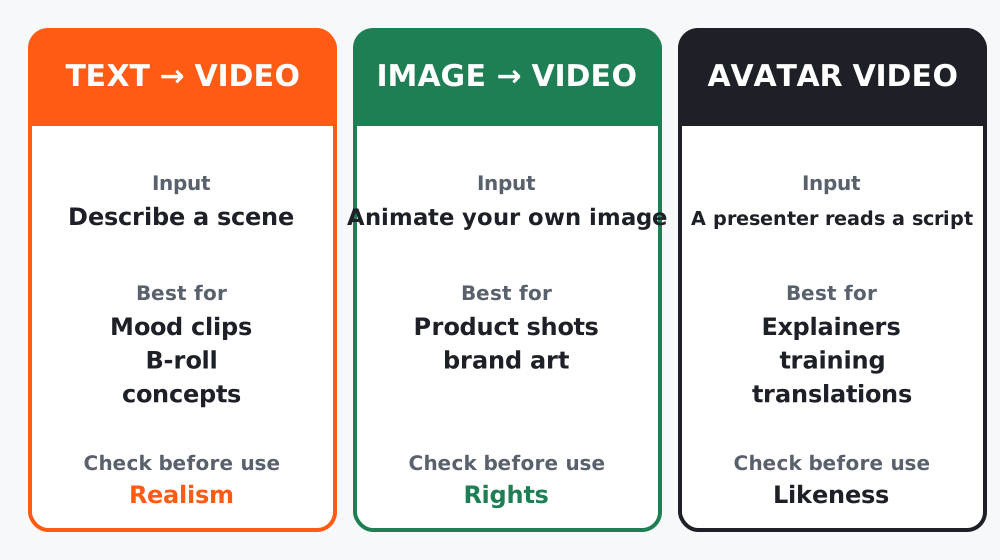 Figure 1. Pick the kind first. The tool comes second.
The three kinds
| Kind | You provide | You get | Typical marketing use |
|---|---|---|---|
| Text to video | A written scene description | A short generated clip | Mood clips, B-roll, concept visuals |
| Image to video | Your own image, plus a motion prompt | The image animated | Product shots, brand art, story frames |
| Avatar video | A script (and a chosen presenter and voice) | A talking presenter | Explainers, training, localized versions |
Most tools combine two or three of these, but the job still falls into one of the rows.
Step 1: Ask three questions
- Does the viewer expect real footage? Testimonials, product demos and “how it looks in real life” should be real. Generating them risks misleading people.
- Can a short clip carry the message? Generated clips are typically short. If your idea needs a long continuous scene, plan to cut several clips together or choose another approach.
- Is it acceptable if it is not perfect? Hands, text in the frame and exact product details can look wrong. Avoid it for anything where small errors damage trust.
Step 2: Good fits and bad fits
| Good fit | Poor fit |
|---|---|
| Background or mood footage for a launch post | A “real customer” review |
| Animating a still of your product on a clean background | Showing exact product dimensions or ingredients |
| A presenter explaining a feature in several languages | A founder message that should come from the founder |
| A concept video that is clearly stylized | A realistic scene of an event that did not happen |
Step 3: Write the one-line brief
Goal: [what the viewer should do or understand]
Kind: [text to video | image to video | avatar | none]
Length: [seconds]
Where it runs: [platform and format]
Must be real: [anything that must not be generated]
Worked example
A bakery wanted a “behind the scenes” video. The brief’s must be real line said: the baker, the shop and the actual bread. They used real phone footage for those and generated only a 4-second animated title card and some stylized steam over a still photo. The result felt honest and still saved an afternoon of editing.
Common mistakes
- Starting from a tool’s feature list instead of a viewer’s need.
- Generating anything a viewer would reasonably assume is real.
- Planning a 60-second single scene.
Checklist
- Kind chosen (or “none”)
- A “must be real” line written
- Length and platform decided