Academy › AI Video for Marketers › Lesson 3
Script and storyboard with Claude
Turn an idea into a six-scene plan with hooks, visuals and on-screen text before you generate anything. · 9 min read
Generating video costs time and credits. A storyboard costs almost nothing, so do the thinking there first.
What you will build
A six-scene storyboard for a 30-second video, with one visual description and one line of on-screen text per scene.
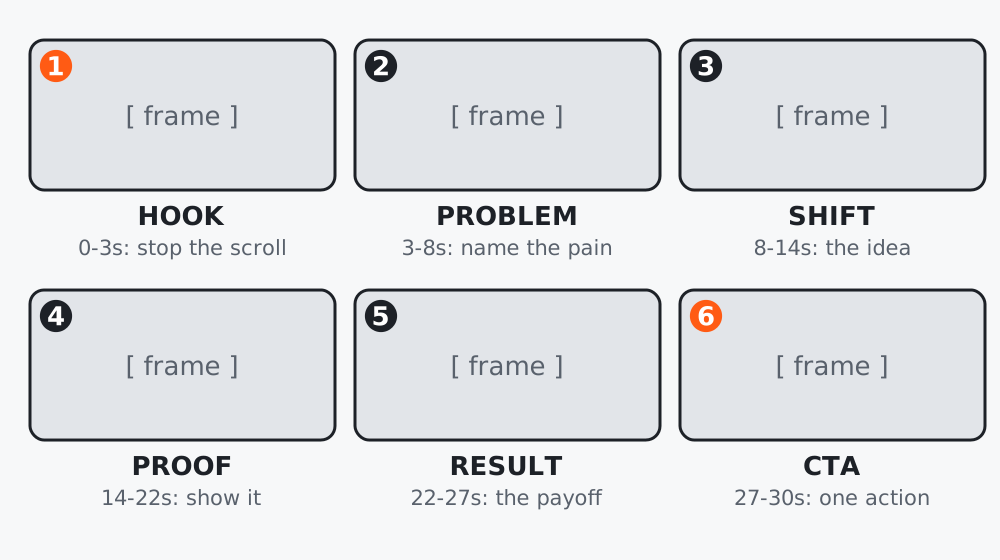 Figure 1. Six scenes in 30 seconds: about five seconds each.
Step 1: Fill the brief
Product or topic:
Viewer (who they are and what they already know):
One promise (what they will get):
One proof you actually have (a number, a result, a real example):
Call to action (one):
Platform and length:
The proof line must be real. If you do not have one, say so; Claude will not invent one if you tell it not to.
Step 2: Ask for a storyboard
Create a 30-second vertical video storyboard in 6 scenes.
Structure: hook (0-3s), problem, shift, proof, result, call to action.
For each scene give: duration, what the viewer sees (one sentence, concrete),
on-screen text (max 6 words), and spoken line (max 12 words).
Use ONLY this proof: [your real proof]. Do not invent numbers, names or testimonials.
Keep the visuals simple enough for an AI video tool: one subject, one action per scene.

[paste brief]
Step 3: Make every scene generable
AI video tools do best with simple scenes. Check each scene for:
- One subject, one action. “A hand pours coffee” is generable. “Customers laugh while the barista juggles cups” is not reliable.
- No required text inside the frame. Generated text often garbles. Add words as captions in editing.
- No exact brand details. Put your logo and product in during editing.
Ask Claude to simplify any scene that fails these.
Step 4: Add a fallback for each scene
For each scene, add a fallback: a simple stock or still-image alternative
that I can use if the generated clip is not usable.
This keeps one bad generation from stopping the whole video.
Worked example
A SaaS founder’s first storyboard had scene 4 as “dashboard showing 3x growth”. They had no such number, so the proof line was empty and the prompt forced a different scene: a real screenshot of their reporting page with a caption describing what it does. It was less flashy and entirely true.
Common mistakes
- Putting dialogue in every scene; viewers watch muted.
- Scenes with two or three actions.
- Skipping the fallback column.
Checklist
- Brief has a real proof (or none)
- Six scenes, each with one subject and one action
- On-screen text added in editing, not generated
- A fallback for each scene