Academy › AI Video for Marketers › Lesson 4
Scene prompts that work
Write prompts with the same six parts every time and iterate by changing one part at a time. · 9 min read
Good prompts are specific and boring. This lesson gives you a structure you can reuse across tools.
What you will build
A prompt template and an iteration log for the scenes in your storyboard.
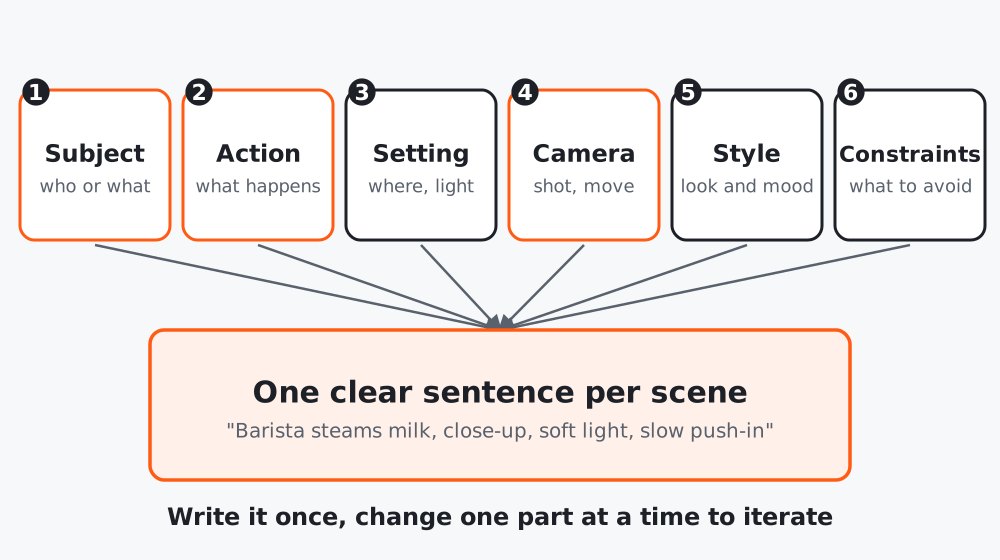 Figure 1. Fill all six parts, then write them as one clear sentence.
The six parts
| Part | Question | Example |
|---|---|---|
| Subject | Who or what is in the shot? | A barista in a green apron |
| Action | What happens? | Steams milk in a metal pitcher |
| Setting | Where, what light, what time? | Small cafe counter, soft morning window light |
| Camera | Shot size, movement, angle | Close-up, slow push-in, eye level |
| Style | The look | Natural, warm film look |
| Constraints | What to avoid | No text, no logos, no extra people |
Different tools weigh these differently and some have their own settings for camera movement and duration. Use the tool’s guide for its controls, but keep the content of the prompt in this structure.
Step 1: Draft the prompt with Claude
Turn this storyboard scene into a video-generation prompt with six parts:
subject, action, setting, camera, style, constraints.
Then write it as one sentence of under 40 words in plain, concrete language.
Avoid abstract words (cinematic, epic, amazing) and brand names.
Scene: [paste one scene]
Step 2: Generate three variations, not thirty
Change one part per variation:
| Version | Changed | Result note |
|---|---|---|
| A | Baseline | |
| B | Camera: wide shot instead of close-up | |
| C | Setting: evening light |
Keep a log. In a week you will have prompts that work for your style and can reuse them.
Step 3: Use a still image when consistency matters
If the same product or character must look the same across scenes, start from an image you control (image to video) rather than describing it again each time. Text-only generation will vary from scene to scene.
Step 4: Know the common failures
| Problem | Try |
|---|---|
| Hands or fingers look wrong | Frame the shot so hands are out of view or small |
| Text is garbled | Remove text from the prompt; add it in editing |
| Motion looks floaty | Use a simpler action and a slower camera move |
| Wrong number of people | Say “one person” and add “no other people” |
| Style drifts between clips | Reuse the same style sentence and start image |
Worked example
A candle brand’s first prompt was “beautiful cinematic candle video”. Results varied wildly. The six-part rewrite named one candle on a wooden table, a hand lighting it, warm evening window light, a slow push-in, natural film look, and “no text, no other objects”. Three variations later they had two usable clips.
Common mistakes
- Changing five things between attempts.
- Asking for words in the frame.
- Describing a whole story in one prompt instead of one scene.
Checklist
- Each scene has a six-part prompt
- Iterations change one part at a time
- A prompt log is kept
- Image-to-video used where consistency matters