Academy › AI Video for Marketers › Lesson 6
Edit and format for every platform
Assemble clips, add captions and sound, and export one master into the formats each platform needs. · 8 min read
Generated clips are raw material. The edit is where it becomes a video someone finishes watching.
What you will build
A master edit and three exports for vertical, square and landscape placements.
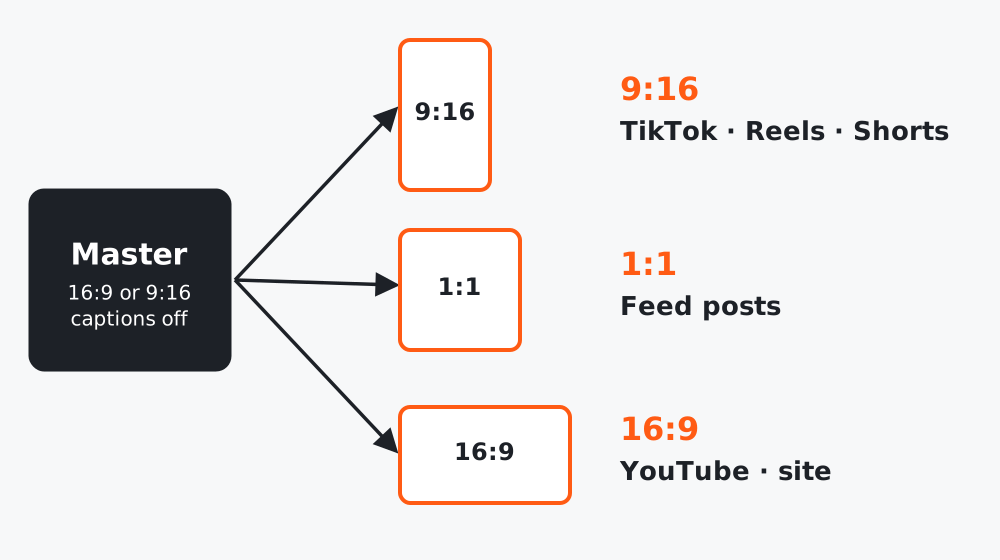 Figure 1. Plan the frame for the most important placement first, then adapt.
Step 1: Assemble in story order
Use your storyboard as the timeline. Trim each clip to what is needed: generated clips often have a slow start and a weak end. Aim for a cut every few seconds.
Step 2: Add what the generator cannot do well
| Add in editing | Why |
|---|---|
| Titles and captions | Generated text is unreliable |
| Logo and exact product shots | Keeps brand details correct |
| Sound design and music | Many clips have none, or generic audio |
| Color match across clips | Clips from different generations vary |
For music and sound effects, use sources whose license allows your use, and keep the license record.
Step 3: Choose the primary format
| Ratio | Typical placements |
|---|---|
| 9:16 | TikTok, Instagram Reels, YouTube Shorts |
| 1:1 | Feed posts |
| 16:9 | YouTube, websites, presentations |
Pick the placement that matters most and compose for it. Keep titles and faces inside a central safe area so cropping to other ratios does not cut them.
Step 4: Export and name files
2026-10-brand-launch_v1_9x16.mp4
2026-10-brand-launch_v1_1x1.mp4
2026-10-brand-launch_v1_16x9.mp4
Use a consistent name including date, project, version and ratio. Platform upload specs change; check each platform’s current requirements for file size, length and resolution before you export.
Step 5: Check on a phone
Watch the final export on a real phone with the sound off, then on. Check that captions are readable, nothing important is under interface elements, and the first 2 seconds make sense.
Worked example
An agency exported a 16:9 master and auto-cropped it to 9:16 for short-form. The product ended up cut in half. Re-composing the master with the product centered fixed all three exports at once.
Common mistakes
- Editing in 16:9 and cropping at the end.
- Unlicensed music, which platforms may mute or remove.
- Not watching it on a phone.
Checklist
- Clips trimmed, captions and logo added in the edit
- Primary format composed with a safe area
- Three exports with consistent names
- Phone check done with and without sound