Academy › AI-Assisted KDP Books › Lesson 3
Plan the interior with Claude
Design page types and templates first so the book is consistent, fast to build and useful to the reader. · 9 min read
A book is a small number of page types repeated well. Plan the page types and the book almost assembles itself.
What you will build
A page-type list, one template for each, and an ordered page map for your book.
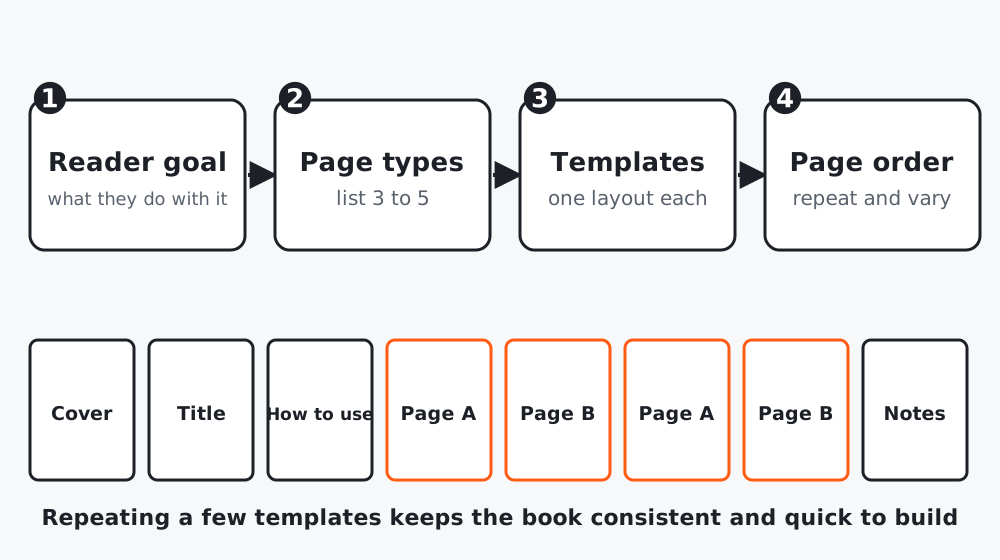 Figure 1. A few templates, repeated in a sensible order.
Step 1: State what the reader does with the book
The reader will [use it for] ... [how often] ... [where].
Success is when they [outcome].
A kids’ coloring book is used at a table with crayons: pages must be single-sided-friendly and not too detailed. A planner is used daily: space and structure matter.
Step 2: Ask for page types
I am making a [format] for [reader] who wants to [outcome].
Propose 3 to 5 page types that cover the whole book. For each give:
purpose, what is on the page, how many times it repeats, and what to avoid.
Propose a page order for [N] pages, including front matter and back matter.
Do not write the content yet.
Step 3: One template per page type
Define each template once: margins, fonts, size of headings, how much space for writing or coloring, where the page number goes. Reuse it everywhere.
Step 4: Draft the text and prompts with limits
For text-based pages, give Claude the template and a count:
Using this page template and the reader goal, write [N] pages of content.
Each page: heading (max 6 words), one instruction or prompt (max 25 words), no claims
about health, money or guaranteed results. Plain language for [age or level].
Vary the prompts so no two are alike.
For illustration-led books, write the list of scenes here, one per page, and then move to the next lessons for creating images.
Step 5: Build a page map
| Pages | Type | Notes |
|---|---|---|
| 1 | Title page | |
| 2 | How to use | Short |
| 3 to 40 | Main page A, B alternating | |
| 41 | Notes |
Count to a total that fits your print plan. Page-count rules, paper and trim options are on KDP’s help pages: read them before you fix the number.
Worked example
A gratitude journal first had 30 different page layouts. Reducing to two (a daily page and a weekly review) halved production time and made the book feel intentional. The weekly page repeated every seventh spread.
Common mistakes
- Making each page different.
- Letting AI write health, money or income claims.
- Fixing page count before reading KDP’s limits.
Checklist
- Reader goal written
- 3 to 5 page types with templates
- Page map with total count
- Content rules (no claims) added to prompts