Academy › AI-Assisted KDP Books › Lesson 4
Consistent illustrations
Create a style sheet and test batch so illustrations look like they belong in the same book. · 9 min read
The most visible flaw in AI-made books is inconsistency: a different style on every page. A style sheet and a test batch fix most of it.
If you use an image tool to create illustrations, the images count as AI-generated for KDP’s disclosure purposes (lesson 2).
What you will build
A style sheet, a five-image test batch and a review checklist.
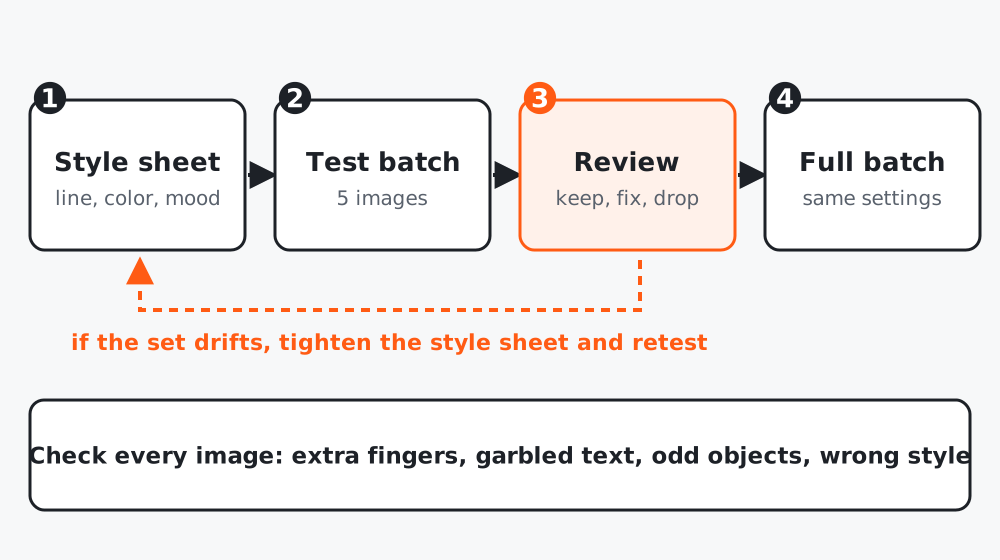 Figure 1. Test small, review, then run the whole book with the same settings.
Step 1: Write the style sheet
STYLE SHEET: [book title]
Line: [thick clean outlines | thin sketchy lines | no outlines]
Color: [black and white only | palette of 5: names/hex]
Detail level: [simple shapes for age 3-5 | medium | detailed]
Backgrounds: [plain white | simple ground line | scenes]
Characters: [description: size, features, clothing, always the same]
Never include: [text, logos, brand characters, realistic faces, ...]
Step 2: Turn it into a reusable prompt
Convert this style sheet into a single paragraph (max 80 words) I can paste
before every image prompt, so the style stays the same. Keep concrete
descriptions only. Then write 10 scene prompts for the book in the form:
"[style paragraph] Scene: [subject doing action in a setting]".
Step 3: Run a test batch of five
Pick five different scenes, not five versions of the same one. Use the same tool, the same settings and the same style paragraph. Place the five images side by side.
Step 4: Review as a set
| Check | Pass? |
|---|---|
| Same line weight and detail level | |
| Characters recognizable as the same | |
| No stray text, extra fingers, odd objects | |
| Fits the page area without cropping | |
| Suitable for the reader’s age | |
| For coloring: closed shapes, enough white space |
If the set drifts, tighten the style sheet (more concrete words, fewer adjectives) and run the test again. Do not start the full batch until five look like one family.
Step 5: Run the batch and check every image
Check each image individually at full size before it goes on a page. Remove any with artifacts. Keep a spreadsheet of image, prompt, tool, date and decision: it supports your AI use statement.
Worked example
A creator generated 30 animal coloring pages in one afternoon and found the line weight varied so much that printed pages looked like three different books. After writing a style sheet and rerunning five-image tests, the final 30 shared the same weight and detail, and about one in six still needed to be rejected for stray marks.
Common mistakes
- Mixing tools or settings within one book.
- Accepting images you did not inspect at full size.
- Copying a living artist’s style by name.
Checklist
- Style sheet and style paragraph written
- Five-image test passes as a family
- Every final image inspected at full size
- Image log saved