Academy › Automation Marketing with Claude › Lesson 1
What marketing automation with Claude really means
Sort your tasks into automate, assist and keep-human before you build anything. · 7 min read
Most people start by asking Claude to “do their marketing”. That produces generic output and a vague feeling that AI is overrated. Automation works when you decide which tasks to hand over and how much to hand over.
What you will build
A one-page task audit: ten recurring marketing tasks, each placed in one of three buckets.
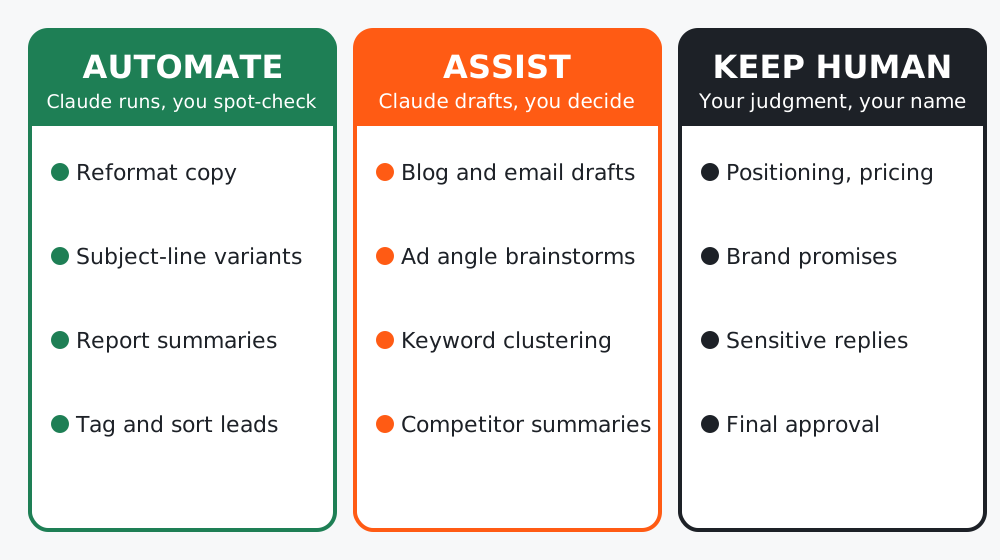 Figure 1. Three buckets. The goal is not to automate everything, it is to put each task in the right bucket.
Step 1: List the work you repeat
Write down every marketing task you did in the last two weeks. Include the boring ones: resizing copy, writing subject lines, summarizing a report. Aim for ten.
Step 2: Score each task
Two questions per task: how often does it repeat, and how bad is it if the output is wrong? Plot them on the grid below.
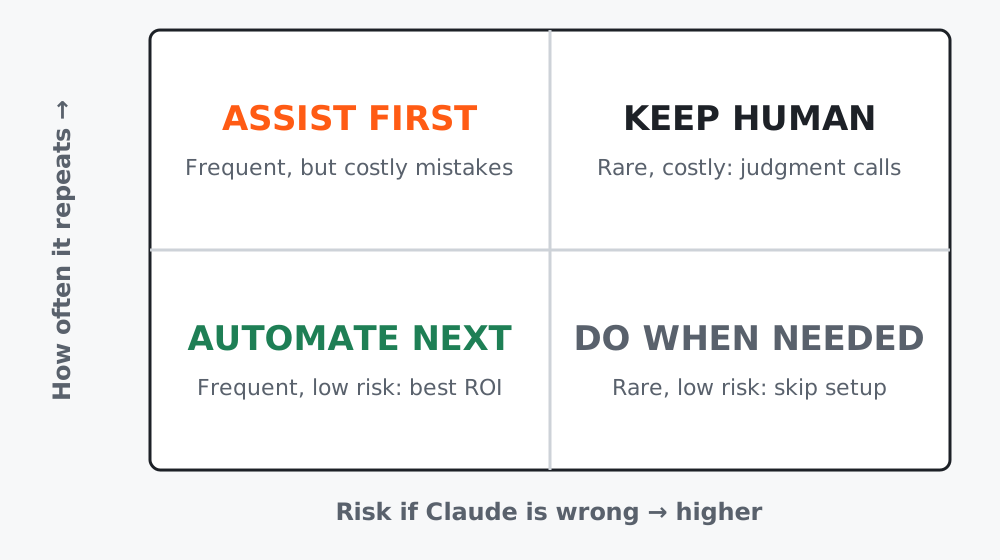 Figure 2. Frequent and low risk is where automation pays back first. Costly mistakes stay with a human.
Step 3: Let Claude audit your list
Paste your task list into Claude with this prompt:
You are a marketing operations analyst. Below is a list of tasks I repeat.
For each task return a table with: task, how often (daily/weekly/monthly),
risk if the output is wrong (low/medium/high), recommended bucket
(automate / assist / keep human), and the first step I could take this week.
Ask me up to 3 questions first if anything is unclear.

Tasks:
[paste your list]
Review the table. You are allowed to disagree: a task Claude calls “automate” may feel too sensitive for you, and that is a valid reason to move it.
Worked example
A solo founder listed: weekly newsletter, product-page edits, replying to refund requests, ad copy variants, monthly report summary. After the audit:
- Automate: monthly report summary
- Assist: newsletter drafts, ad copy variants
- Keep human: refund replies, product-page claims
The result is a short, honest plan: two assist workflows to build first, one automation later.
Common mistakes
- Automating the task you dislike most instead of the one that repeats most.
- Putting claims about price, results or guarantees in the automate bucket.
- Skipping the audit and building a workflow nobody uses.
Checklist
- I listed at least ten recurring tasks
- Each task has a bucket and a first step
- I picked ONE task to build in the next lesson