Academy › Automation Marketing with Claude › Lesson 2
Build your Claude marketing workspace
Set up a project with a brand-voice file, an audience doc and a reusable prompt library. · 8 min read
A blank chat forgets who you are every time. A workspace remembers it. In this lesson you set up one place where Claude always starts with your voice, your audience and your offers.
What you will build
A Claude project called “Marketing HQ” holding four things: a brand-voice file, an audience and offer doc, examples, and short project instructions.
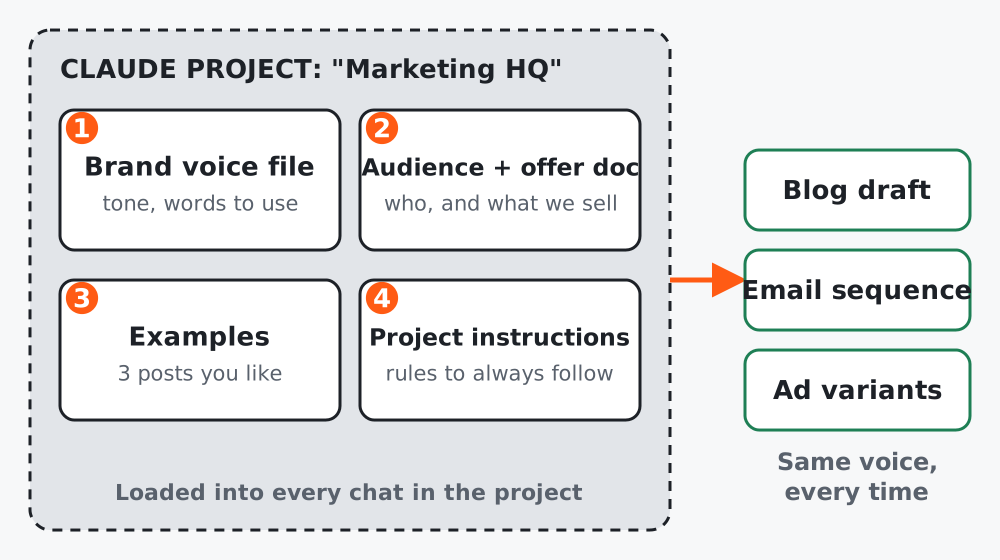 Figure 1. Everything in the project is available to every chat you start inside it.
Step 1: Create the project
Projects are self-contained workspaces with their own chat history and knowledge base: you upload documents and context, and add project instructions to tailor the replies. Anthropic’s help center explains the current options in What are projects?. Plan limits change, so check that page for what your account includes.
Start a chat, open the + menu and choose Add to project (or create the project from the Projects page).
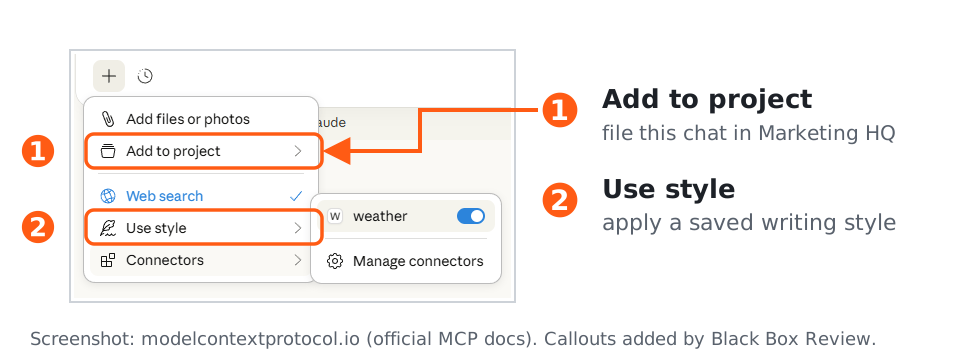 Figure 2. The + menu: 1 puts a chat into a project, 2 applies a saved writing style. Source: MCP documentation. Callouts added by us. The interface may look different in your version.
Step 2: Write a brand-voice file
Give Claude three samples of writing you like (your own, if possible) and ask it to describe the voice.
Read the three samples below. Write a brand-voice guide of max 300 words with:
1. Tone in five adjectives
2. Sentence style (length, rhythm, person)
3. Words and phrases we use
4. Words and phrases we never use
5. Two before/after rewrites that show the voice

Samples:
[paste 3 samples]
Edit the result by hand. This file is the most valuable asset in your workspace, so read it critically.
Step 3: Add the audience and offer doc
Interview me one question at a time to build an "Audience and offer" doc.
Cover: who we serve, their main problem in their own words, what we sell,
price range, three objections we hear, and what we do NOT do.
When finished, output the doc in under 400 words.
Step 4: Write short project instructions
Keep these under ten lines. Example:
You are the marketing assistant for [brand].
Always follow the brand-voice guide and the audience doc in this project.
Never invent statistics, testimonials or prices. If you lack a fact, ask.
Write in plain English, short paragraphs, no hype.
Before long outputs, give a 3-bullet plan and wait for a yes.
Step 5: Save a prompt library
Create a document in the project called “Prompt library” and paste in every prompt that worked, each with a title and a one-line “when to use”. The next lessons add to it.
Worked example
A small ecommerce brand pasted three product emails into the voice prompt. Claude described the voice as “warm, direct, lightly funny, no exclamation marks”. The owner deleted the “lightly funny” line because it did not match the brand, and added two banned words. That edit took five minutes and changed every later draft.
Common mistakes
- Uploading everything. A short, curated set beats a pile of PDFs.
- Letting Claude write the voice guide without editing it.
- Forgetting to update the files when the offer or tone changes.
Checklist
- Project created and named
- Brand-voice file edited by a human
- Audience and offer doc saved
- Instructions under ten lines
- Prompt library started