Academy › Advanced Marketing Automation with Claude › Lesson 1
System design for marketing operations
Design every automation from the same eight parts, and decide what must never run unattended. · 9 min read
The basic course taught you to use Claude. This one teaches you to run it: reliably, cheaply, and safely, on data that is not yours to leak. Everything starts with a design you can reason about.
What you will build
By the end of the course you will have a small Python project that:
- reads leads from a CSV and labels each one with a typed result,
- redacts personal data before anything reaches a model,
- runs in batches and estimates its own cost,
- calls your own tools with a step limit,
- keeps every draft in an approval queue, and
- is scored against a hand-labelled set before you change a prompt.
You can type it in as you go, copy the files shown in each lesson, or download the finished project (code, tests and sample data). The tests run without an API key.
The eight parts
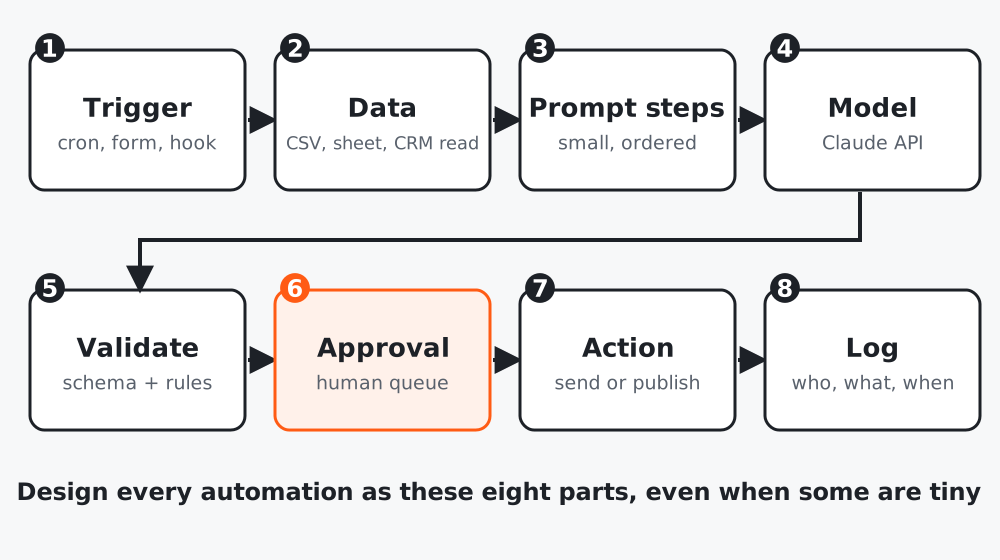 Figure 1. Even a ten-line script has these parts. Naming them shows you what is missing.
| # | Part | Question to answer |
|---|---|---|
| 1 | Trigger | What starts it: a schedule, a form, a person? |
| 2 | Data | Where does it read from, and is that data allowed to leave your systems? |
| 3 | Prompt steps | Which small steps does the work get split into? |
| 4 | Model | Which model per step, and what does it cost? |
| 5 | Validate | What makes an output acceptable or rejected? |
| 6 | Approval | Who must say yes before anything leaves the building? |
| 7 | Action | What actually changes in the world? |
| 8 | Log | Can you answer “who, what, when, why” a month later? |
Step 1: Draw the system before you build it
Pick one workflow from the basic course and fill the table. Example for lead handling:
| Part | Choice |
|---|---|
| Trigger | Daily at 08:00 |
| Data | New rows in leads.csv exported from the form tool |
| Prompt steps | Classify the lead, then draft a reply |
| Model | A smaller, cheaper model for classification; a larger one for the draft |
| Validate | Labels must be one of the allowed values; draft under 120 words, no price claims |
| Approval | A person approves every reply for the first month |
| Action | Save an email draft in the mail tool (never send) |
| Log | One line per lead: id, label, cost, status |
Step 2: Decide what may never run unattended
Write a short “red list”. A good starting list:
- Anything that sends to a customer
- Anything that changes prices, promises or guarantees
- Anything that deletes or overwrites records
- Anything that spends money (ads, paid APIs) without a cap
Items on the red list always go through the approval queue (lesson 7). Items off it can run on a schedule once they pass their evaluation (lesson 9).
Step 3: Set up the project
mkdir mkt_pipeline && cd mkt_pipeline
python3 -m venv .venv && source .venv/bin/activate
pip install anthropic pydantic
mkdir data tests
Keep your key out of the code. The Anthropic SDK reads it from the ANTHROPIC_API_KEY environment variable, so export it in your shell or a secrets manager, never in a file you commit.
Step 4: Add the shared settings
# config.py
"""Shared settings. Change the model id in one place."""
import os

MODEL = os.environ.get("CLAUDE_MODEL", "claude-sonnet-5-5")  # check the models page for current ids
MAX_TOKENS = 1024
MAX_RETRIES = 2
# Rough price guards (USD per million tokens). Look up current prices before you rely on these.
PRICE_IN_PER_M = float(os.environ.get("PRICE_IN_PER_M", "3"))
PRICE_OUT_PER_M = float(os.environ.get("PRICE_OUT_PER_M", "15"))
Two things to notice. The model id lives in one place, so changing it for every step is one edit. And the price numbers are placeholders you must replace with the current prices from Anthropic’s pricing page; they exist so the cost estimate has something to multiply.
Worked example
A small agency wanted “AI to answer all inbound leads”. Drawing the eight parts exposed three gaps in ten minutes: the form tool exported phone numbers (data), nobody owned approval (approval), and there was no way to know a draft had gone out twice (log). They fixed those on paper, before writing a line of code.
Common mistakes
- Starting with the model call and bolting on approval later.
- Letting one script do trigger, data, model and action with no log.
- Treating the red list as “we will be careful” instead of a rule enforced in code.
Checklist
- One workflow described in the eight-part table
- A written red list of things that never run unattended
- Project folder, virtual environment and
config.pycreated - API key stored outside the code