Academy › Advanced Marketing Automation with Claude › Lesson 7
The human approval queue
Hold every outbound draft in a queue, with a history, until a named person approves it. · 9 min read
Automation without a gate is a liability. The gate does not need to be fancy; it needs to be impossible to skip.
What you will build
A queue that stores drafts as pending, lets a person move them to approved or rejected, and refuses to mark anything sent unless it was approved.
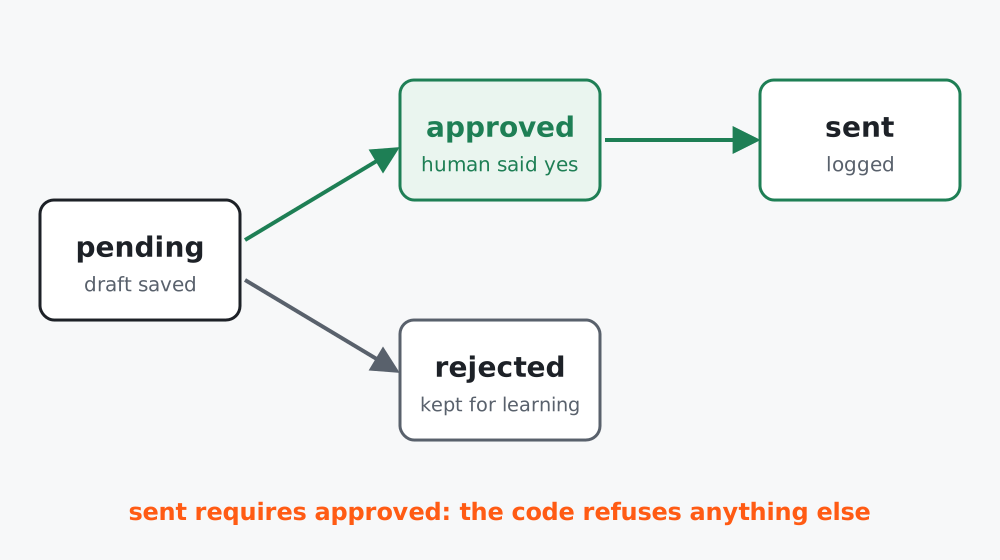 Figure 1. The only path to “sent” goes through “approved”.
Step 1: The queue
# approval_queue.py
"""A tiny human-approval queue stored as JSON lines. Nothing is sent until status == approved."""
from __future__ import annotations
import json
import time
from pathlib import Path

ALLOWED = {"pending", "approved", "rejected", "sent"}


class Queue:
    def __init__(self, path: str):
        self.path = Path(path)
        self.path.touch(exist_ok=True)

    def _read(self) -> list[dict]:
        return [json.loads(l) for l in self.path.read_text(encoding="utf-8").splitlines() if l.strip()]

    def _write(self, items: list[dict]) -> None:
        self.path.write_text("".join(json.dumps(i, ensure_ascii=False) + "\n" for i in items), encoding="utf-8")

    def add(self, item_id: str, kind: str, body: str, meta: dict | None = None) -> None:
        items = self._read()
        if any(i["id"] == item_id for i in items):
            return  # idempotent: re-running a job does not duplicate drafts
        items.append({"id": item_id, "kind": kind, "body": body, "meta": meta or {},
                      "status": "pending", "created": int(time.time()), "history": []})
        self._write(items)

    def set_status(self, item_id: str, status: str, who: str) -> None:
        if status not in ALLOWED:
            raise ValueError(f"bad status {status}")
        items = self._read()
        for i in items:
            if i["id"] == item_id:
                if status == "sent" and i["status"] != "approved":
                    raise PermissionError("only approved items can be sent")
                i["history"].append({"from": i["status"], "to": status, "by": who, "at": int(time.time())})
                i["status"] = status
                self._write(items)
                return
        raise KeyError(item_id)

    def by_status(self, status: str) -> list[dict]:
        return [i for i in self._read() if i["status"] == status]
Three behaviours are deliberate:
- Idempotent
add. Running the job twice does not create two drafts for the same id. Choose ids from the thing (lead id, campaign id and date), not from a random number. - Illegal transition raises.
sentwithoutapprovedthrowsPermissionError. The rule is enforced in code, not left to discipline. - History. Every change records who and when. When someone asks “who approved this?”, you can answer.
Step 2: A review command
Reviewers should not edit JSON by hand. A tiny command-line tool is enough for a solo marketer or a two-person team:
# review.py
import sys
from approval_queue import Queue

q = Queue("queue.jsonl")
who = sys.argv[1] if len(sys.argv) > 1 else "me"

for item in q.by_status("pending"):
    print("\n" + "=" * 60)
    print(f"{item['id']}  [{item['kind']}]  {item['meta'].get('title', '')}")
    print(item["body"])
    answer = input("approve / reject / skip? ").strip().lower()
    if answer == "approve":
        q.set_status(item["id"], "approved", who)
    elif answer == "reject":
        q.set_status(item["id"], "rejected", who)
Step 3: The sender
Sending is a separate, boring script that only touches approved items. It is the only code that has credentials for your email tool.
# send_approved.py
from approval_queue import Queue

def send(item):          # replace with your email tool's draft or send call
    print("sending:", item["id"])

q = Queue("queue.jsonl")
for item in q.by_status("approved"):
    send(item)
    q.set_status(item["id"], "sent", "sender-bot")
Because the sender reads only approved, a bug in the drafting pipeline cannot cause a send.
Step 4: Make approving fast
A gate that is painful gets bypassed. Three habits help:
- Show what changed. Include the source facts and the check results next to the draft.
- Batch the review. One 10-minute slot per day beats scattered interruptions.
- Graduate low-risk items. After a month with a 98% approval rate for one kind (for example internal summaries), you may auto-approve that kind, but never customer-facing sends from the red list.
Test it
The queue tests cover: a duplicate add is ignored, sent before approved raises, the history shows approved then sent, and an unknown id raises KeyError. They run in milliseconds and need no files outside a temporary folder.
Worked example
A coaching business let Claude draft replies to enquiry emails. For two weeks every draft went through the queue. Reviewers rejected 11 of 80, mostly for one pattern: the draft promised a call within 24 hours. They added that to the prompt rules (lesson 2) and to the citation check (lesson 5), and the rejection rate fell to 3 of 80 the next fortnight. The queue’s history made the pattern visible.
Common mistakes
- Approving in the same tool that sends, so the click does both.
- No “rejected” state, so you never learn from what was refused.
- Sharing one login so history says “admin” for everything.
Checklist
- Nothing outbound is sent except from
approveditems - Illegal transitions raise errors
- History records who and when
- Review has a fixed slot and a short command