Academy › Advanced Marketing Automation with Claude › Lesson 8
Scheduling and monitoring
Run jobs on a schedule without double runs, silent failures or surprise bills. · 10 min read
A job you run by hand is a chore. A job on a schedule is a system, and systems need to tell you when they break.
What you will build
A run wrapper that logs every run and refuses to run twice for the same period, an alert check, and a scheduled GitHub Actions workflow.
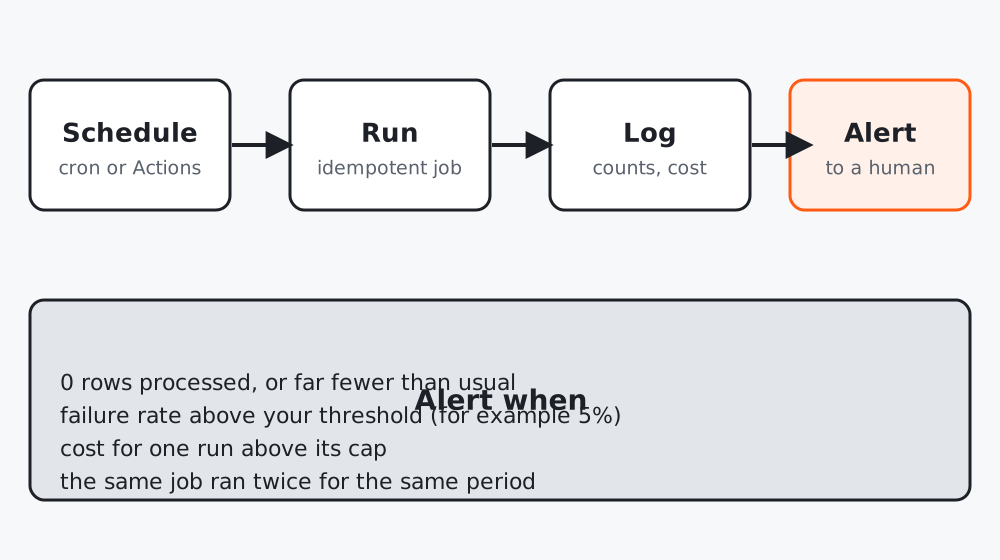 Figure 1. Silence is not success. Decide in advance what counts as a bad run.
Step 1: Make the job safe to run twice
Schedulers sometimes run a job twice, or you rerun it by hand after a failure. The wrapper below keys each run to a period (for example today’s date) and refuses a second successful run for that period. A failed period can be retried.
# runner.py
"""Wrap a job so every run is logged, not run twice for the same period, and can raise alerts."""
from __future__ import annotations
import json
import time
from pathlib import Path


class AlreadyRan(Exception):
    pass


def run_once(job, period: str, log_path: str = "runs.jsonl") -> dict:
    """Run `job()` once per `period` (for example '2026-10-12'). Returns the stats dict the job returns."""
    log = Path(log_path)
    log.touch(exist_ok=True)
    entries = [json.loads(l) for l in log.read_text().splitlines() if l.strip()]
    if any(e["period"] == period and e["status"] == "ok" for e in entries):
        raise AlreadyRan(period)
    started = time.time()
    try:
        stats = job()
        entry = {"period": period, "status": "ok", "stats": stats, "seconds": round(time.time() - started, 2)}
    except Exception as e:  # record the failure, then re-raise so the scheduler shows a red run
        entry = {"period": period, "status": "error", "error": str(e)[:300], "seconds": round(time.time() - started, 2)}
        with log.open("a") as f:
            f.write(json.dumps(entry) + "\n")
        raise
    with log.open("a") as f:
        f.write(json.dumps(entry) + "\n")
    return stats


def check_run(stats: dict, expected_rows: int | None = None, max_failure_rate: float = 0.05, max_cost: float = 5.0) -> list[str]:
    """Return alert messages for a finished run. Empty list means quiet."""
    alerts = []
    rows, failed = stats.get("rows", 0), stats.get("failed", 0)
    if rows == 0:
        alerts.append("0 rows processed")
    elif expected_rows and rows < expected_rows * 0.5:
        alerts.append(f"only {rows} rows, expected about {expected_rows}")
    if rows and failed / rows > max_failure_rate:
        alerts.append(f"failure rate {failed / rows:.0%} above {max_failure_rate:.0%}")
    if stats.get("cost", 0) > max_cost:
        alerts.append(f"cost ${stats['cost']} above cap ${max_cost}")
    return alerts
Use it like this:
import datetime
from runner import run_once, check_run
from classify_leads import classify_file
import anthropic

def job():
    usage = classify_file(anthropic.Anthropic(), "data/leads.csv", "results.csv", "errors.csv")
    rows = sum(1 for _ in open("data/leads.csv")) - 1
    cost = usage.input_tokens / 1e6 * 3 + usage.output_tokens / 1e6 * 15   # use config prices
    return {"rows": rows, "failed": usage.failures, "cost": round(cost, 4)}

stats = run_once(job, datetime.date.today().isoformat())
for alert in check_run(stats, expected_rows=200):
    print("ALERT:", alert)        # replace with an email or chat message to a person
Step 2: Decide what should alert you
| Condition | Why |
|---|---|
| 0 rows processed | An export or filter broke upstream |
| Far fewer rows than usual | Same, but partial |
| Failure rate above a threshold | A prompt or model change broke output |
| Cost above a cap | A loop, a larger input, or a pricing change |
| A period ran twice | Your scheduler is misconfigured |
Keep thresholds in code and review them monthly. An alert you always ignore is worse than none.
Step 3: Schedule it
On GitHub, a workflow with a schedule trigger runs on a cron expression. The times are in UTC. Store your key as a repository secret, never in the file:
# .github/workflows/daily-leads.yml
name: Daily lead classification
on:
  schedule:
    - cron: "0 1 * * *"      # 01:00 UTC every day
  workflow_dispatch: {}       # lets you run it by hand
jobs:
  run:
    runs-on: ubuntu-latest
    steps:
      - uses: actions/checkout@v4
      - uses: actions/setup-python@v5
        with: { python-version: "3.12" }
      - run: pip install anthropic pydantic
      - run: python run_daily.py
        env:
          ANTHROPIC_API_KEY: ${{ secrets.ANTHROPIC_API_KEY }}
This file has not been run for you: check GitHub’s documentation for current action versions and for how scheduled workflows are delayed or disabled in inactive repositories. Whatever scheduler you choose (a server cron, GitHub Actions, Claude Code’s own scheduling features), the contract stays the same: log, idempotent, alert.
Step 4: Keep the data out of the repository
Lead files and logs contain personal data. Do not commit them. Read from a private location the job has access to, and write results where only your team can reach them. Add data/, results.csv, errors.csv, runs.jsonl and queue.jsonl to .gitignore.
Test it
The tests cover: a second successful run for the same period raises AlreadyRan; a failed run is logged as error and can be retried, so the log reads ok, error, ok; and each alert condition fires on the numbers that should trigger it and stays silent on healthy numbers.
Worked example
A weekly report job started returning “0 rows” after the form tool renamed a column. Without an alert, the team would have sent an empty report for a month. With the zero-rows rule, the first run failed loudly, the cause was found in minutes, and the thresholds were kept.
Common mistakes
- No log, so you cannot tell what ran.
- Treating “the schedule fired” as “the job worked”.
- Putting API keys in the workflow file.
Checklist
- Each run is keyed to a period and logged
- Alerts exist for zero rows, failure rate, cost and double runs
- Secrets are in the scheduler’s secret store
- Data and logs are not committed