Academy › Advanced Marketing Automation with Claude › Lesson 4
Batch jobs, cost control and prompt caching
Process thousands of items cheaply and know what a run will cost before you start it. · 11 min read
Looping over rows works for 50 leads. At 5,000 you need a plan for time, money and failures.
What you will build
A batch builder that creates one request per item, and a reader that separates successes from failures.
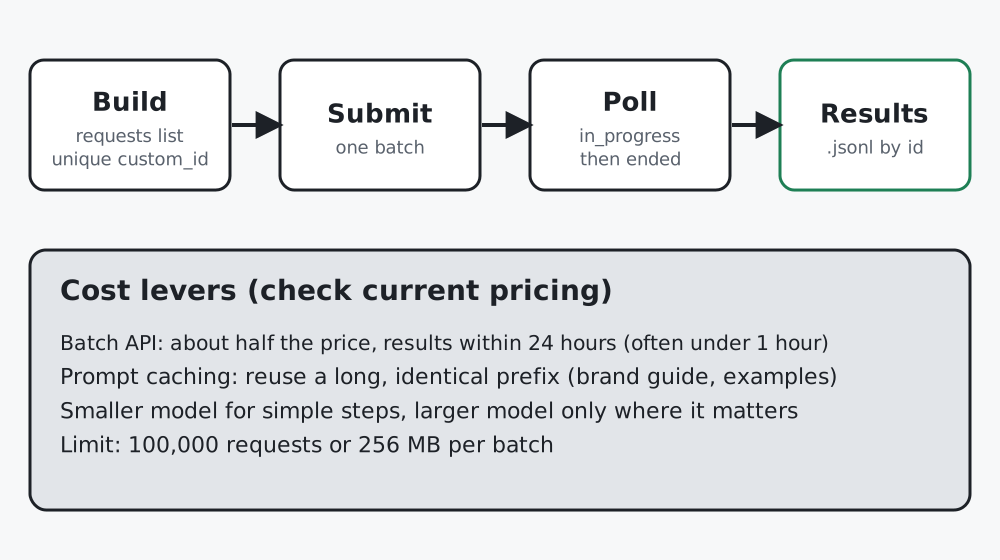 Figure 1. Batches are asynchronous: you submit, wait, then collect results by id.
What the documentation says (checked at writing time)
| Topic | Fact | Why you care |
|---|---|---|
| Message Batches | Reduces cost by 50% and increases throughput; most batches finish in under an hour | Use for anything that does not need an instant answer |
| Limits | A batch holds up to 100,000 requests or 256 MB | Split larger jobs |
| Expiry | Batches not finished within 24 hours expire; results stay available 29 days | Download results promptly |
| Prompt caching | 5-minute cache by default, 1-hour option at extra cost; cache reads cost a fraction of base input price | Cache a long, identical prefix |
Pricing and limits change. Treat this table as a reading list, then confirm on the official pricing and batch pages before you budget.
Step 1: Build requests with unique ids
# batch_jobs.py
"""Build and read Message Batches requests (asynchronous, for large jobs)."""
from __future__ import annotations
import json
import config


def build_requests(items: list[dict], system: str, make_prompt) -> list[dict]:
    """One request per item. custom_id must be unique so you can match results back."""
    seen = set()
    out = []
    for item in items:
        cid = str(item["id"])
        if cid in seen:
            raise ValueError(f"duplicate custom_id {cid}")
        seen.add(cid)
        out.append({
            "custom_id": cid,
            "params": {
                "model": config.MODEL,
                "max_tokens": config.MAX_TOKENS,
                "system": system,
                "messages": [{"role": "user", "content": make_prompt(item)}],
            },
        })
    return out


def split_results(jsonl_lines: list[str]) -> tuple[dict, dict]:
    """Return (succeeded {id: text}, failed {id: reason}) from a results .jsonl."""
    ok, bad = {}, {}
    for line in jsonl_lines:
        if not line.strip():
            continue
        rec = json.loads(line)
        cid, res = rec["custom_id"], rec["result"]
        if res["type"] == "succeeded":
            parts = res["message"]["content"]
            ok[cid] = "".join(p.get("text", "") for p in parts if p.get("type") == "text")
        else:
            bad[cid] = res["type"]
    return ok, bad
The custom_id is how results find their way back. The code refuses duplicates, because results arrive in any order.
Step 2: Submit and collect
The official Python pattern creates the batch with a list of requests and later streams the results. Write it as a separate script so you can re-run collection without re-submitting:
import anthropic
from batch_jobs import build_requests, split_results

client = anthropic.Anthropic()
requests = build_requests(rows, SYSTEM, make_prompt)   # rows: list of dicts with an "id"
batch = client.messages.batches.create(requests=requests)
print(batch.id, batch.processing_status)               # in_progress

# ... later, once processing has ended:
lines = []
for result in client.messages.batches.results(batch.id):
    lines.append(result.model_dump_json())             # one JSON object per result
ok, failed = split_results(lines)
Two details from the documentation worth remembering: validation of each request’s parameters happens asynchronously, so errors show up when the batch ends; test your request shape with a single normal Messages call first. And an errored result with an invalid_request_error must be fixed before you resend, while other errors can usually be retried.
Step 3: Estimate cost before you run
from guard import estimate_cost, rough_tokens
import config

rows_text = [r["message"] for r in rows]
tokens_in = sum(rough_tokens(t) + 250 for t in rows_text)   # +250 for the system prompt
tokens_out = 120 * len(rows)                                # your typical reply size
cost = estimate_cost(tokens_in, tokens_out, config.PRICE_IN_PER_M, config.PRICE_OUT_PER_M)
print(f"Estimated cost: ${cost} for {len(rows)} items")
assert cost < 5.00, "Over the cap: stop and review"
This is deliberately rough; it is a speed bump, not an invoice. After a real run, compare against the token counts in the response and adjust the constants.
Step 4: Cache what repeats
If every request begins with the same long brand guide or example set, caching lets you pay the full price once and a small fraction after. The documented automatic form puts cache_control at the top level of the request:
response = client.messages.create(
    model="claude-sonnet-5-5",
    max_tokens=1024,
    cache_control={"type": "ephemeral"},
    system=LONG_BRAND_GUIDE,
    messages=[{"role": "user", "content": row_prompt}],
)
Things that stop caching from working: the shared part is not identical between calls, it is shorter than the minimum length for the model, or the gap between calls exceeds the cache lifetime. Put the long, unchanging text first and the varying part last.
Step 5: Pick the model per step
Use the smallest model that passes your evaluation (lesson 9). In the lead pipeline, extraction and classification usually tolerate a smaller model, while the customer-facing draft is where the larger one earns its cost.
Worked example
A newsletter with 8,000 subscribers wanted every subscriber tagged by interest from their sign-up note. A sequential loop would have taken hours and cost full price. As a batch it was submitted once, collected the next morning, and the 37 failed rows (empty notes) were listed by custom_id and tagged “unknown” by a simple rule.
Common mistakes
- Reusing a
custom_id, then not knowing which result belongs to which item. - Re-submitting a whole batch to fix three failures. Re-run only the failed ids.
- Building the cost estimate after the job.
Checklist
- Every request has a unique
custom_id - Failures are separated and re-run alone
- A cost estimate and a hard cap run before submission
- Long repeated text is placed first so it can be cached