Academy › Advanced Marketing Automation with Claude › Lesson 10
Governance, privacy and your capstone project
Put consent, redaction, retention, audit and cost caps around the system, then ship one pipeline. · 12 min read
The first nine lessons made the system work. This one makes it something you can defend: to a customer, a regulator or your own future self.
What you will build
Four small controls around the pipeline and a capstone checklist you can show to someone else.
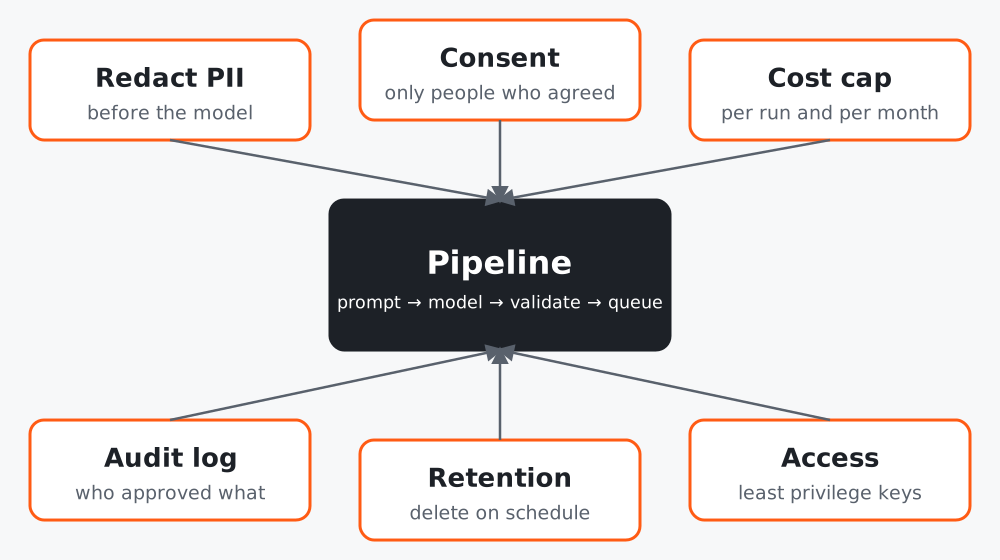 Figure 1. Controls surround the pipeline. They are code and configuration, not good intentions.
This is not legal advice. Privacy and marketing rules differ by country and by industry. Use this lesson to ask the right questions, then check the requirements that apply to you.
Control 1: Consent filter
Only process and email people who agreed. Treat blank as “no”.
# governance.py
"""Small, testable governance helpers: consent filter, retention purge, cost guard."""
from __future__ import annotations
import csv
import time
from pathlib import Path


def filter_consented(rows: list[dict], field: str = "consent") -> tuple[list[dict], list[dict]]:
    """Split rows into (allowed, blocked). Only an explicit 'yes' counts; blank means no."""
    allowed = [r for r in rows if str(r.get(field, "")).strip().lower() == "yes"]
    blocked = [r for r in rows if r not in allowed]
    return allowed, blocked


def purge_old(path: str, days: int, now: float | None = None, ts_field: str = "created") -> int:
    """Delete JSONL records older than `days`. Returns how many were removed."""
    import json
    now = now or time.time()
    cutoff = now - days * 86400
    p = Path(path)
    if not p.exists():
        return 0
    keep, removed = [], 0
    for line in p.read_text(encoding="utf-8").splitlines():
        if not line.strip():
            continue
        rec = json.loads(line)
        if rec.get(ts_field, now) < cutoff:
            removed += 1
        else:
            keep.append(line)
    p.write_text("".join(l + "\n" for l in keep), encoding="utf-8")
    return removed


class CostGuard:
    """Raise before a run goes over a spending cap."""

    def __init__(self, cap: float):
        self.cap, self.spent = cap, 0.0

    def add(self, amount: float) -> None:
        if self.spent + amount > self.cap:
            raise RuntimeError(f"cost cap ${self.cap} would be exceeded (spent ${self.spent}, next ${amount})")
        self.spent = round(self.spent + amount, 6)
filter_consented keeps only an explicit “yes” (case and spaces ignored) and returns the blocked rows so you can see how many were excluded. The tests cover blank, missing and “No” values.
Control 2: Redact before you send
You built redact in lesson 3. Extend it for your data (order numbers, street addresses) and keep a test for each pattern you add. Also decide what the model should never see at all, for example payment details or health information.
Control 3: Retention
Decide how long you keep drafts, logs and results, then delete on schedule. purge_old removes records older than N days from a JSONL file and returns the count. Run it from your scheduler and log the number removed.
Control 4: A cost guard
CostGuard raises before a run goes over its cap, so a bug or an unexpectedly large file stops early instead of ending in a surprising invoice.
Records you should be able to produce
| Question | Where the answer lives |
|---|---|
| Who approved this message? | Approval queue history |
| What data did the model see? | Redacted prompt in the run log |
| Which model and prompt version? | Run log (model id, prompt file name) |
| Did this person consent? | Consent column and source |
| How long do we keep this? | Retention setting and purge log |
Vendor and data questions to settle
- Where does the data go, and what are the provider’s terms on retention and training use for the plan you use? Read the current terms, do not assume.
- Who on your team has the API key, and can you rotate it?
- Do your customers’ agreements or local rules limit sending their data to a third-party model?
Capstone project
Ship one pipeline, end to end, for a real task:
- Write the eight-part design (lesson 1) and the red list.
- Implement it with typed outputs, redaction and a retry cap (lessons 2 and 3).
- Add a cost estimate and cap (lesson 4) and, if it uses your content, citations (lesson 5).
- Route every outbound item through the queue (lesson 7).
- Schedule it with a run log and alerts (lesson 8).
- Score it on a golden set and write down the minimums (lesson 9).
- Add consent, retention and an audit record (this lesson).
Capstone acceptance checklist
- A stranger can read the design table and understand what runs and why
- All tests pass offline, and one of each kind has been seen failing on purpose
- The golden set has been scored and the gate passes
- A dry run on 20 real, redacted items has been read by a human
- Nothing leaves the building without a named approver
- The first scheduled week is watched daily, then weekly
After the course
Keep a one-page “automation register”: name, owner, what it touches, its red-list items, its last evaluation date and its next review. Review it monthly, retire what nobody uses, and re-run the golden set whenever the provider changes the model or your prompt changes.
Common mistakes
- Treating consent as a checkbox in a form and never reading it in code.
- Keeping every log forever “just in case”.
- Skipping the review after a model update.
Final checklist
- Consent, redaction, retention and cost cap exist as code with tests
- Records answer “who, what, which version, when”
- The automation register exists and has an owner
- Capstone pipeline is live behind the approval queue
Back to: Course overview