Academy › Advanced Marketing Automation with Claude › Lesson 6
Tool use and MCP: let Claude call your functions
Give Claude narrow, read-first tools, handle errors safely and cap the number of steps. · 12 min read
So far you called the model. Now the model may call you: to read a number, look up a record or save a draft. This is what turns a text generator into an agent, and it is where permissions matter most.
What you will build
A tool loop in about 50 lines with two tools: one that reads campaign stats, one that saves a draft for review. Neither can send anything.
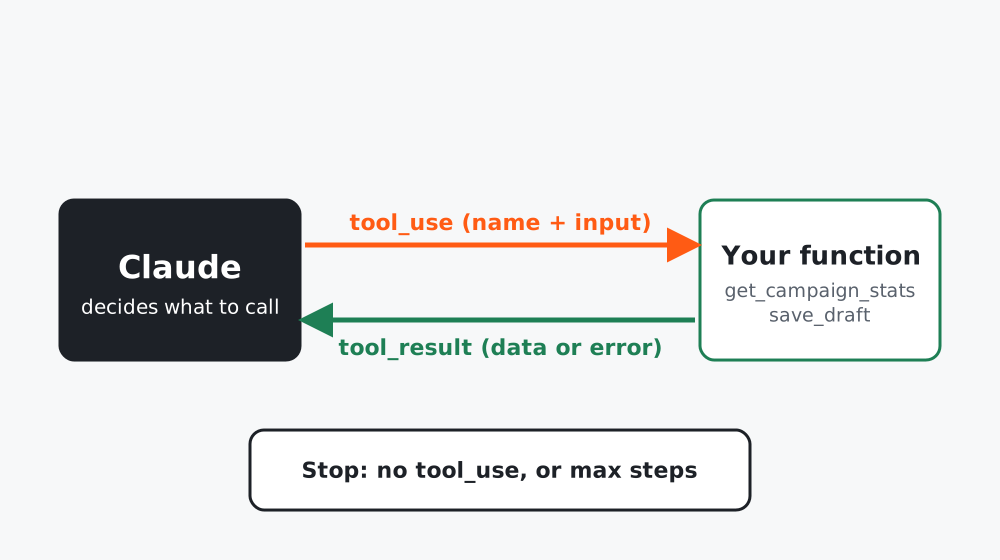 Figure 1. Your code executes the tool. The model only asks.
How it works, from the docs
With client tools, the model replies with stop_reason: "tool_use" and one or more tool_use blocks. Your code runs the operation and sends back a tool_result. A tool is defined by a name, a description and a JSON input_schema. The description is part of the prompt: write it as an instruction.
Step 1: The loop
# agent_loop.py
"""A minimal tool-use loop: Claude may call your functions; every result goes back as a tool_result."""
from __future__ import annotations
import json
import config

TOOLS = [
    {
        "name": "get_campaign_stats",
        "description": "Return opens, clicks and unsubscribes for one email campaign by id. Read-only.",
        "input_schema": {
            "type": "object",
            "properties": {"campaign_id": {"type": "string", "description": "Campaign id, e.g. 'welcome-1'"}},
            "required": ["campaign_id"],
        },
    },
    {
        "name": "save_draft",
        "description": "Save a draft message for a human to review. It does NOT send anything.",
        "input_schema": {
            "type": "object",
            "properties": {"title": {"type": "string"}, "body": {"type": "string"}},
            "required": ["title", "body"],
        },
    },
]


def run_agent(client, task: str, handlers: dict, max_steps: int = 6) -> list[dict]:
    """Loop until Claude stops asking for tools or max_steps is reached. Returns the message history."""
    messages = [{"role": "user", "content": task}]
    for _ in range(max_steps):
        resp = client.messages.create(
            model=config.MODEL, max_tokens=config.MAX_TOKENS, tools=TOOLS, messages=messages
        )
        messages.append({"role": "assistant", "content": resp.content})
        if resp.stop_reason != "tool_use":
            return messages
        results = []
        for block in resp.content:
            if getattr(block, "type", "") != "tool_use":
                continue
            handler = handlers.get(block.name)
            if handler is None:
                out, is_error = f"Unknown tool {block.name}", True
            else:
                try:
                    out, is_error = json.dumps(handler(**block.input)), False
                except Exception as e:  # return the error to the model instead of crashing the run
                    out, is_error = f"Tool error: {e}", True
            results.append({"type": "tool_result", "tool_use_id": block.id, "content": out, "is_error": is_error})
        messages.append({"role": "user", "content": results})
    raise RuntimeError(f"Agent did not finish within {max_steps} steps")
Design choices, spelled out:
- Step limit. A loop with no ceiling is a cost and safety bug. Six steps is generous for most marketing tasks.
- Errors go back to the model. A failed tool call returns
is_error: truewith a message so the model can recover, instead of crashing your run. - Unknown tool names are handled, not trusted.
- No tool can send.
save_draftonly saves. Sending is a separate, human-approved step (next lesson).
Step 2: Write the handlers
import csv
from approval_queue import Queue

queue = Queue("queue.jsonl")

def get_campaign_stats(campaign_id: str) -> dict:
    with open("data/campaigns.csv", newline="", encoding="utf-8") as f:
        for row in csv.DictReader(f):
            if row["campaign_id"] == campaign_id:
                return {k: row[k] for k in ("campaign_id", "sent", "opens", "clicks", "unsubscribes")}
    raise KeyError(f"No campaign {campaign_id}")

def save_draft(title: str, body: str) -> dict:
    item_id = "draft-" + title.lower().replace(" ", "-")[:40]   # stable id: re-runs do not duplicate
    queue.add(item_id, "email", body, {"title": title})
    return {"saved": item_id, "status": "pending"}

HANDLERS = {"get_campaign_stats": get_campaign_stats, "save_draft": save_draft}
Step 3: Run it with a narrow task
import anthropic
from agent_loop import run_agent

history = run_agent(
    anthropic.Anthropic(),
    "Compare the opens and clicks for campaigns welcome-1 and welcome-2, "
    "then save a short draft message to the team summarising which performed better. "
    "Only use numbers returned by the tools.",
    HANDLERS,
)
Test it without a key
The tests script the model’s replies: one tool_use, then a final text. They check that the result is returned with the right tool_use_id, that an unknown tool or a raised exception becomes an is_error result instead of a crash, and that exceeding max_steps raises. All three run offline.
Going further: expose your tools through MCP
If you want Claude Desktop, Claude Code or another MCP client to use the same tools without custom glue, you can wrap them as an MCP server. The official Python guide builds a server with the mcp package using this shape:
from mcp.server import MCPServer

mcp = MCPServer("campaign-stats")

@mcp.tool()
async def get_campaign_stats(campaign_id: str) -> str:
    """Return opens, clicks and unsubscribes for one campaign.

    Args:
        campaign_id: Campaign id, for example welcome-1
    """
    ...

if __name__ == "__main__":
    mcp.run(transport="stdio")
You then register the server in the client’s configuration (for Claude Desktop, the mcpServers section of claude_desktop_config.json, with command and args). Follow the current instructions in the build-a-server guide: package and class names change between releases, and the sketch above is an adaptation we have not run here. Do not point a server at production write access until it has passed the same tests as any other tool.
Permissions checklist for any tool
- Read-only first. Add a write tool only when a workflow needs it.
- Prefer “create draft” over “send” and “propose change” over “apply change”.
- Validate inputs inside the tool, not in the prompt.
- Log every call with its arguments (minus personal data).
Common mistakes
- Giving the agent one powerful tool (“run SQL”) instead of several narrow ones.
- Letting a tool description promise more than the tool does.
- Retrying a failed tool call forever.
Checklist
- Each tool does one thing and has a plain-language description
- No tool can send, delete or spend without a human step
- Step limit and error handling tested offline
- Tool calls are logged