Academy › Advanced Marketing Automation with Claude › Lesson 2
Prompts for pipelines: small steps and strict outputs
Split work into steps, give each a narrow job, and make outputs predictable enough for code. · 9 min read
A chat prompt can be vague because a human reads the answer. A pipeline prompt feeds code, so it must be narrow, consistent and testable.
What you will build
A two-step prompt chain for leads: extract facts, then decide. Each step has one job and one output shape.
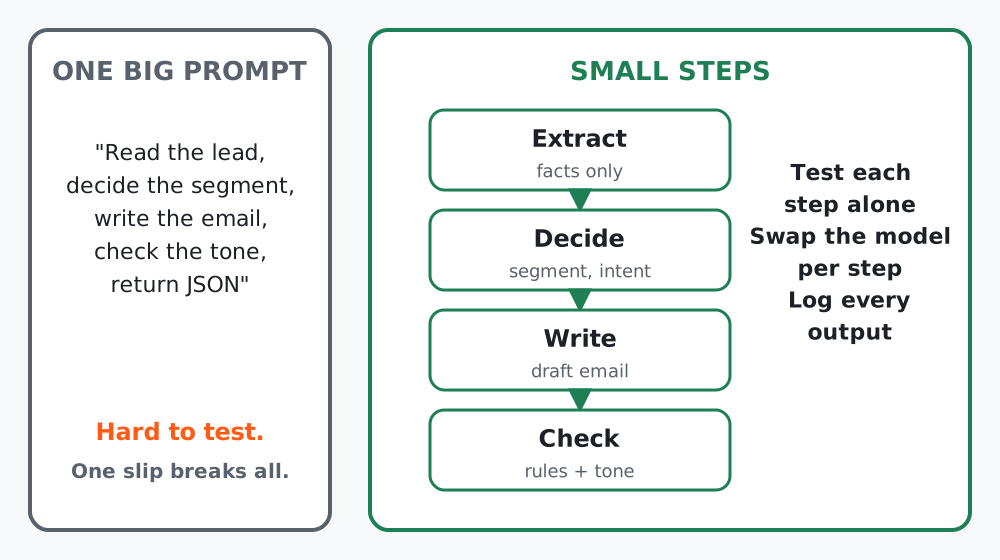 Figure 1. Small steps are easier to test, to swap models on, and to debug.
Step 1: Give every step one verb
If a prompt contains “and then”, split it. A useful rule of thumb: one step, one verb.
| Step | Verb | Output |
|---|---|---|
| A | Extract | A short list of facts that appear in the text |
| B | Decide | One label from a fixed list |
| C | Write | A draft in your brand voice |
| D | Check | A pass/fail with reasons |
Step 2: Write the extraction prompt
You extract facts from a marketing lead's message. Use only what is written.
Return a JSON object with these keys:
  company_type (string or "unknown")
  team_size (string or "unknown")
  asked_for (list of short strings; empty if none)
  deadline (string or "unknown")
Do not guess. Do not add keys. Do not include the person's name or contact details.
Notice the rules: only what is written, “unknown” instead of guessing, no extra keys, and no personal data in the output. These four lines prevent most downstream mess.
Step 3: Write the decision prompt
The decision step should not see the raw message again; it sees the extracted facts. That keeps it cheap and consistent.
You assign a lead to exactly one segment and one next action using ONLY the facts provided.
Segments: freelancer, small_business, agency, enterprise, unknown
Next actions: send_demo_invite, send_nurture_email, no_action
If the facts are insufficient, use "unknown" and "send_nurture_email".
Explain in one sentence that cites the fact you used.
Step 4: Make examples part of the prompt
Two to four short examples teach the format better than more instructions. Include one example of a lead that should get no_action, because models tend to overfit to “everyone is a good lead”.
Example input facts:
{"company_type": "unknown", "team_size": "unknown", "asked_for": [], "deadline": "unknown"}
Example output:
{"segment": "unknown", "next_action": "send_nurture_email", "reason": "No facts about the company or request."}
Step 5: Version your prompts like code
Store prompts in files, not inside functions, and put a version in the name. When a score changes (lesson 9) you can say which prompt caused it.
prompts/
  extract_v1.txt
  decide_v1.txt
  decide_v2.txt   # added the no_action example
Worked example
A shop first used one prompt to “read the email, decide if it is a refund request, write a reply and flag angry customers”. It worked in demos and failed on long emails. Split into extract, classify and write, the classification step reached stable results with a model one tier smaller, and the writing step was the only one that needed the larger model.
Common mistakes
- Asking a step to extract and judge.
- Letting a prompt return prose “plus JSON”. Return only JSON (the next lesson makes this enforceable).
- Passing the full raw message to every step, which costs more and leaks more.
Checklist
- Each step has one verb and one output shape
- “unknown” is allowed everywhere, so the model is never forced to guess
- At least one negative example in each decision prompt
- Prompts are saved in versioned files