Academy › Vibe Coding for Non-Developers › Lesson 2
Choose your tool by the job
Match your project to a type of AI coding tool, then compare the six facts that actually matter before you pay. · 8 min read
New AI coding tools launch every month and rankings go stale in weeks. Instead of memorizing names, learn to choose by the job and then verify the current details yourself.
What you will build
A shortlist of one tool for your course project, with the six facts you need checked and dated.
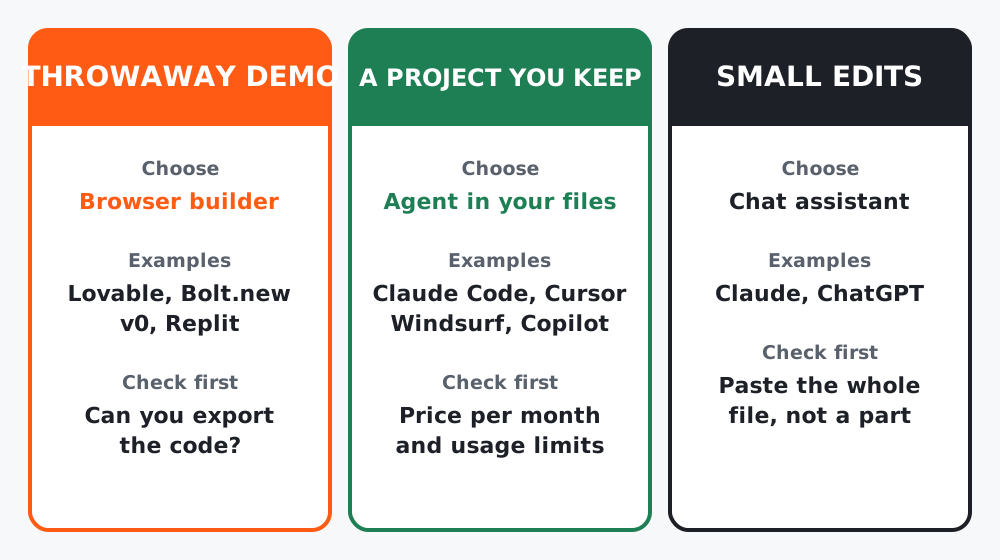 Figure 1. Job first, tool type second, then compare plans.
Step 1: Match the job to the type
| Job | Tool type | Examples |
|---|---|---|
| A demo to show someone this week, then throw away | Browser builder | Lovable, Bolt.new, v0, Replit |
| A project you will keep, change and ship | Agent in your files | Claude Code, Cursor, Windsurf, GitHub Copilot, Qoder |
| A small edit, a script, or understanding a file | Chat assistant | Claude, ChatGPT |
Browser builders are the fastest way to get something on screen, which is why many people start there. The catch is ownership: if you cannot export the code and run it yourself, you are renting your app. Agents in your files are slower on day one and faster every day after.
The course project uses an agent in your files. If you prefer to start in a browser builder, do lessons 1 to 4 there, export the code, and switch for lesson 5 onwards.
Step 2: Compare the same six facts
For each candidate, write down these six facts and the date you checked them:
- Price and limits. Monthly fee, and what you get for it: messages, credits, tokens or hours. Where does it stop and what does it cost past that point?
- Where the code lives. On your computer, in their cloud, or both? Can you download everything with one click?
- Can it run commands? Installing packages, starting the app, running tests. If it cannot, you will be doing that part by hand.
- Deployment. Built in, or do you bring your own host (lesson 9)? Built in is convenient; your own host is portable.
- Privacy. Is your code used for training? Is there an off switch? This matters if the project includes customer data.
- Lock-in. If you stop paying tomorrow, what do you still have?
Tool: ________   Checked on: ________
1. Price/limits:
2. Code lives:
3. Runs commands:
4. Deploy:
5. Privacy:
6. If I stop paying I keep:
Step 3: Choose, and stop choosing
Pick one. Use it for the whole course. Switching tools mid-project is the single most common way beginners lose a week, because each tool has its own habits and you end up relearning instead of building.
Worked example
A marketing manager compared Lovable and Claude Code for a waitlist page. Lovable won on day one: a page in ten minutes, hosted. But fact 2 and fact 6 decided it: he wanted the code in his own GitHub so a developer could pick it up later. He used Lovable for a one-hour mock-up to show his boss, exported it, and continued in Claude Code. Both tools earned their place.
Common mistakes
- Choosing by a YouTube demo instead of by the six facts.
- Paying for three tools at once “to compare”. Compare on free tiers, then pay for one.
- Ignoring the privacy fact until the project contains a customer list.
Checklist
- Job type identified
- Six facts written down for at least one tool, with the date
- One tool chosen for the whole course