Academy › Vibe Coding for Non-Developers › Lesson 5
The build loop
Run the four-step loop that turns a plan into a working app: ask small, run it, look, feed back, and checkpoint after each step. · 9 min read
This is the lesson the whole course is built around. Everything before it was preparation; everything after it is this loop with extra safety.
What you will build
The first three steps of your plan, working in the browser, each with a checkpoint.
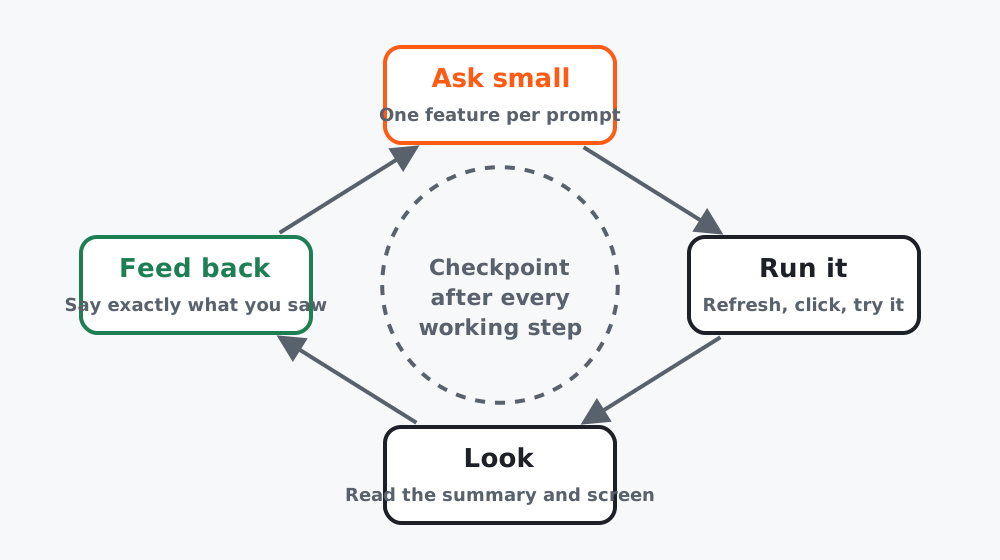 Figure 1. Four moves, then a checkpoint. Repeat until “Done means” is true.
The loop
- Ask small. One plan step, or one feature, per prompt. Never “build the whole thing”.
- Run it. Refresh the browser. Click the thing. Type in the form. Try it on your phone if it is a screen.
- Look. Read the tool’s summary of what it changed. Look at the screen. Do both, every time.
- Feed back. Tell it exactly what you saw, not what you felt. “The button is there but clicking it does nothing” beats “it doesn’t work”.
After the step works: checkpoint. Until lesson 8, the simplest way is to ask the tool:
This step works. Commit it with a short message describing what was added.Step 1: Walking skeleton first
Your first prompt builds the ugliest possible end-to-end version. For the course project:
Do step 1 of the plan in PROJECT.md: a single page with a heading,
one email input, a submit button, and a thank-you message that
replaces the form after submit. No styling, no saving yet.
Tell me what you changed and how to test it.
Ugly is the point. You now have something to improve instead of something to imagine.
Step 2: One feature per prompt
Prompt template for every later step:
Do step N of the plan: [paste the step].
Rules:
- Change only what this step needs. Do not refactor or restyle other parts.
- If you need a key or a service, stop and tell me before writing code.
- When done, list the files you changed and give me exact steps to test.
The “change only” rule matters. Left alone, tools love to tidy things you did not ask about, and that is where mysterious breakage comes from.
Step 3: Feed back with specifics
| Weak feedback | Strong feedback |
|---|---|
| “Doesn’t work” | “After submit, the page reloads and the form is empty again. No thank-you message.” |
| “Make it better” | “Headline wraps to three lines on my phone. Make it shorter or smaller.” |
| “There’s an error” | Paste the whole error, and say what you clicked just before it |
Worked example
Course project, first session:
- Walking skeleton: heading, input, button, thank-you state. Worked first try. Checkpoint.
- Save to the sheet via a form endpoint. Tool asked for the endpoint URL and a key, which went in
.env. First test: nothing arrived. Feedback: “Thank-you shows but no row in the sheet. Here is the browser console: [pasted].” The key name in.envdid not match the code. Fixed in one more prompt. Checkpoint. - Duplicate email shows “You’re already on the list”. Worked. Checkpoint.
Three steps, about 90 minutes, three checkpoints.
Common mistakes
- Asking for five features in one prompt, then not knowing which one broke things.
- Not running the app before the next prompt. If you skip “run”, you lose “look”.
- Reading only the screen and not the summary, so you miss “I also updated the config”.
- Prompting for an hour without a checkpoint, then wanting to go back.
Checklist
- Walking skeleton runs in the browser
- At least two more plan steps done, one prompt each
- A checkpoint after every working step