Academy › Vibe Coding for Non-Developers › Lesson 10
Security, costs and when to call a developer
Run a pre-launch security review you can understand, cap what the project can cost you, and know the four signs it is time to bring in a professional. · 9 min read
Vibe-coded apps fail in three repeating ways: a secret leaks, a stranger does something the builder never imagined, or a bill arrives. All three are avoidable with an hour of attention before launch, and none require you to become a security expert.
What you will build
A completed pre-launch review, spend caps on every service, and a written answer to “when do I call a developer”.
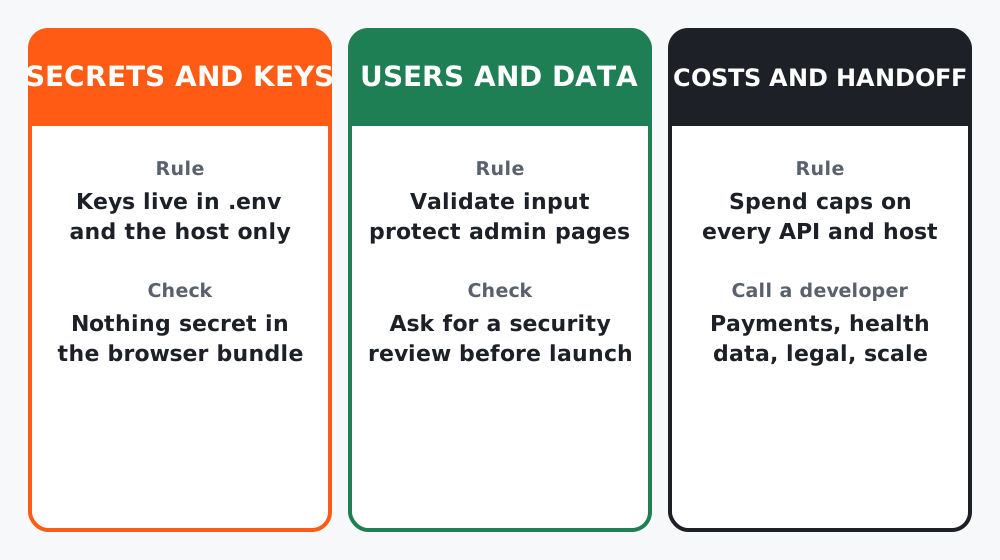 Figure 1. Three cards, three habits.
Step 1: Secrets and keys
Rule: keys live in .env locally and in the host’s environment settings in production. Nowhere else.
Check: anything shipped to the browser is public. Ask:
List every secret this project uses and where each one is read.
Is any of them included in code that runs in the browser? If so,
move it to the server side and tell me what changed.
Also check the GitHub repository one more time for .env, and rotate any key you ever pasted into a chat by mistake.
Step 2: Users and their data
Strangers will type things into your form you did not expect: scripts, 10,000-character strings, the same email 500 times. Ask for a review in words you can follow:
Review this project for security as if a stranger wanted to abuse it.
Cover: input validation, rate limiting on the form, anything an
anonymous user can reach that they should not, and how personal data
is stored and deleted. Explain each issue in plain language, rank by
severity, and fix the top three with minimal changes.
Then two human checks:
- Admin pages. If there is any page only you should see, is it actually protected, or just unlinked?
- Data promise. Your brief said how long you keep data. Is that true? Add one line to the page saying what you collect and why. For EU or UK visitors, that line is not optional.
Step 3: Costs
Every pay-as-you-go service can surprise you. Before launch:
- Set a monthly spend cap or alert on the AI tool, the host and any API.
- Know your host’s free-tier limits (bandwidth, builds, function calls) and what happens when you hit them: pause, or bill?
- Put the total expected monthly cost at the top of
PROJECT.md.
Step 4: When to call a developer
You can build and run a great deal alone. Call a professional, at least for a review, when any of these appear:
- Payments. Taking card details yourself is out. Use a hosted checkout, and still get a review.
- Sensitive data. Health, finances, children, anything you would not want leaked with your name on it.
- Scale. Real traffic, paying customers, or other people’s jobs depending on it.
- Legal. Contracts, consent, regulated industries.
Handing off is easy if you did lessons 3, 4 and 8: send the GitHub link, PROJECT.md and README.md. A developer can be useful within an hour instead of a week.
Step 5: Keep it alive
Once a month, ten minutes:
Check this project for outdated dependencies with known security
issues, update the safe ones, run the build, and tell me if anything
needs my decision.
Commit, push, confirm the live site still passes lesson 9’s stranger test.
Worked example
Course project review found two things: the form endpoint key was being read in browser code (moved server-side in one prompt), and nothing stopped repeat submissions (a simple rate limit added). Spend caps set on the AI tool and the host. Expected monthly cost: zero until launch. “Call a developer” answer written down: “when I add the paid download”.
Common mistakes
- Assuming a page is private because nothing links to it.
- Treating the security prompt as a one-time thing. Run it again after any feature that touches data.
- No spend caps, then a surprise bill from an API loop.
- Hiring a developer with no brief, no repo and a folder of screenshots.
Checklist
- No secrets in browser code or on GitHub
- Security review done, top three fixed, data line on the page
- Spend caps set on every service
- “Call a developer when” written at the top of
PROJECT.md
You are done
You have a brief, a loop, a debugging routine, an undo button, a live site and a review habit. That is not a toy; that is how a lot of real software gets made now. Pick the next idea from your “Nice to have” list, or start a new PROJECT.md.