Academy › Vibe Coding for Non-Developers › Lesson 6
Debug with AI without losing a day
Report errors so the AI can fix them, make it think before it types, and use the three-strikes rule to escape fix-break loops. · 9 min read
Something will break. The difference between a 10-minute fix and a lost afternoon is almost never the bug. It is how you report it and when you stop.
What you will build
A debugging routine you can run from memory, and a fix for at least one real bug in your project.
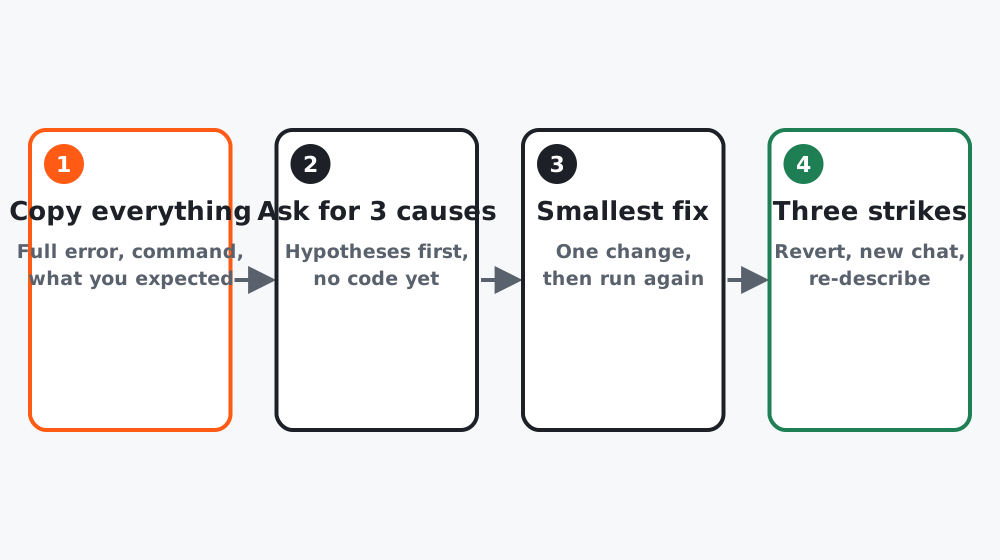 Figure 1. The fourth box is the one that saves the day.
Step 1: Report like a tester
Every bug report to the AI has four parts:
What I did: [the exact clicks or command]
What I expected: [one sentence]
What happened: [one sentence]
Evidence: [full error text from the terminal AND the browser console]
The browser console is under the developer tools (F12, or right-click, then Inspect, then Console). Copy everything red. Partial errors produce partial fixes.
Step 2: Make it think before it types
Tools default to fixing immediately, which is how a wrong guess turns into three wrong files. Slow it down:
Do not change any code yet. Give me the 3 most likely causes of this,
ranked, with how you would confirm each one. Then wait.
Pick the one that sounds most plausible, or say “check the first one”. Then:
Make the smallest change that tests cause 1. Tell me what to look for.Step 3: The three-strikes rule
If three attempts at the same bug fail, stop. More attempts in the same conversation usually make things worse, because the tool is now reasoning from its own wrong guesses.
- Revert to the last checkpoint (
git checkout .or ask the tool to “discard all changes since the last commit”). - Start a fresh conversation so the bad guesses are gone.
- Re-describe the feature from the brief, not the bug. Often the second approach avoids the bug entirely.
Step 4: Two prompts for when you are lost
When you do not understand what the code does:
Explain what [file] does in plain language, for someone who does not
program. What would break if it were deleted?
When a fix seems to work but you do not trust it:
Explain why this fix works and whether it could break anything else.
If you are not sure, say so.
Worked example
Course project: the form saved on the laptop but not on the phone. Four-part report, with the phone’s error captured through remote debugging, showed a network error. Three causes requested: a CORS setting on the endpoint, a mixed http/https URL, a mobile ad blocker. The second was confirmed in one change: the endpoint URL in .env started with http://. Ten minutes, one prompt, no new files.
Earlier the same evening, a styling bug had eaten 40 minutes and three attempts. Revert, fresh chat, re-describe: fixed in one prompt.
Common mistakes
- Pasting “there’s an error” with no error.
- Letting the tool “fix” five times in a row.
- Not reverting because “it’s almost there”. It is usually not.
- Fixing a symptom in a file you do not understand without asking what the file does.
Checklist
- One real bug reported with all four parts
- Causes requested before a fix at least once
- You know how to revert to the last checkpoint